In short
Claude user interviews start well: Claude writes the guide, drafts a screener and finds patterns in transcripts you paste in, but it cannot talk to a user. Add Tracy AI Interviewer as a connector and the same chat sets up the interviews, each user joins from a link, Tracy asks the follow-up a short answer needs, and a recording and timestamped transcript sit behind every result. You read it and decide.
What Claude does well in user interviews
Claude user interviews start with real strengths. Claude can write a discussion guide, draft a screener and find patterns in transcripts you paste in. What it cannot do alone is talk to a user, and a guide full of good questions stays unasked until a tool does the talking.
Tracy AI Interviewer is that tool. You ask Claude for an interview and approve a draft, and Tracy interviews each person on video, asking follow-ups in their own field. This page sets it up with one example: people who started a trial of an invoicing app and never paid. The flow is the same for a researcher, a product manager or a founder, and it is the first page to read before the UX research version.
What does Claude do and what does Tracy do?
Claude asks what you want to learn, drafts the interview, rewrites it when you ask and later reads the results back to you. Tracy talks with each user on video, waits for the end of the thought and asks for the missing detail. Claude is not in the interview. Tracy has delivered 100K+ interviews, with a reported 99% completion rate, and the connector starts the same interviewer as the web app.
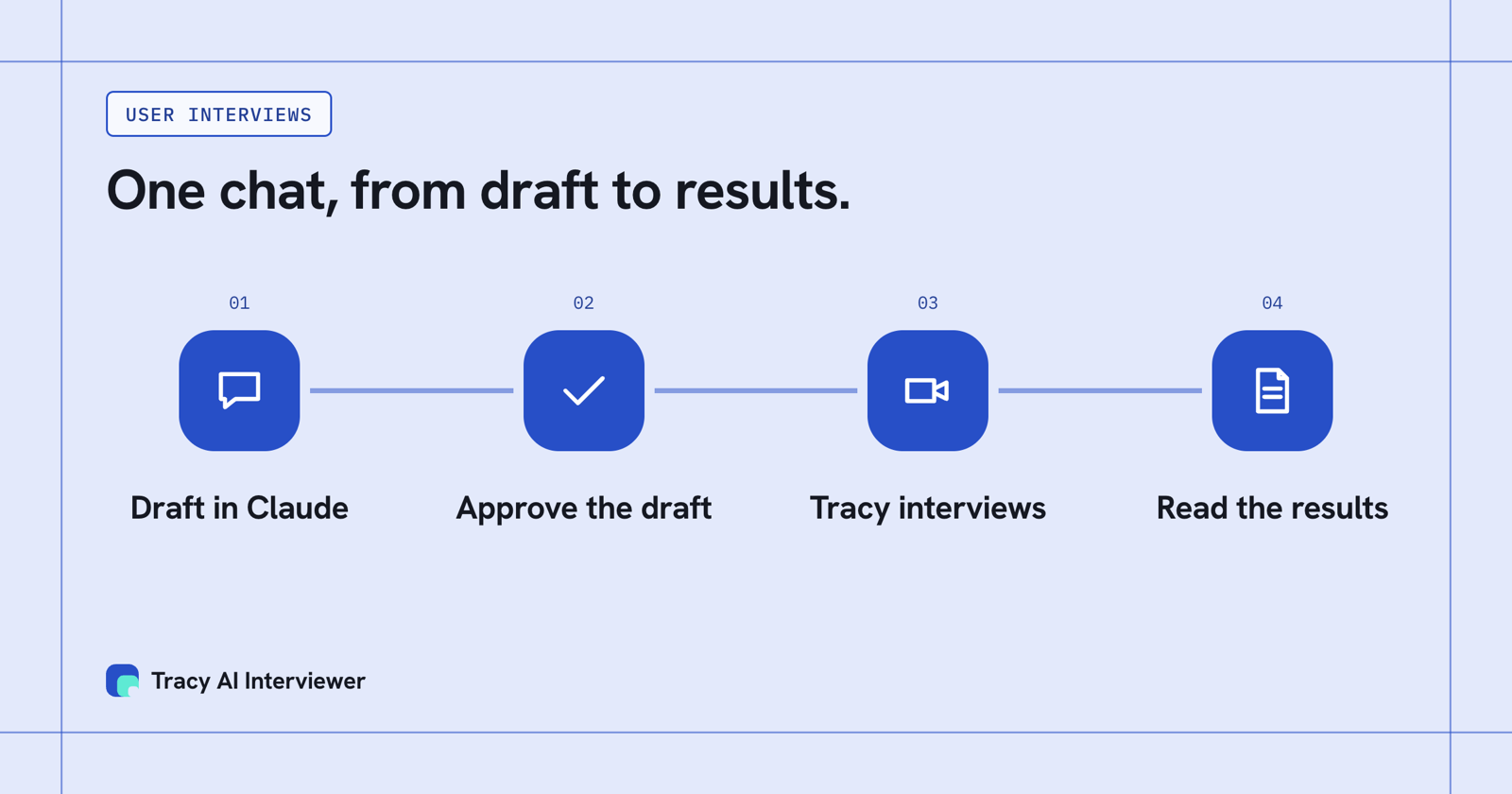
You ask in Claude, approve the draft, Tracy interviews, and the results come back to the same chat.
Anthropic runs a research tool of its own on the same pattern. Anthropic Interviewer, a research tool run by Anthropic, has Claude draft a guide that researchers refine, interview each participant with follow-ups, then pull out themes and quotes that researchers validate. A product team wants that shape for its own users, and the connector is how you get it: interviews with your own customers, using your own guide, your own users and your own reading of the findings.
What Tracy adds to Claude user interviews
Three things change when Tracy does the interviewing.
01 Reach every user
Each user starts on click, at any hour, with no scheduling and no researcher on the call. One link replaces a calendar of bookings.
02 Ask the next question
Tracy follows what the user said in their own field and waits for the answer. "Too complicated" becomes which step, and when.
03 Keep the evidence
Every result includes a recording, a timestamped transcript and what the user said to each question.
How do you set up user interviews in Claude?
The steps are the same in Claude Desktop and in claude.ai. Anthropic lists custom connectors on the Free, Pro, Max, Ultra, Team and Enterprise plans, with one allowed on Free.
- Open Customize > Connectors, click + Add, then Add custom connector.
- Name it
Tracy AI Interviewer, pastehttps://tracyinterview.ai/mcp, then click Continue and Add. - Click Connect, sign in to Tracy if asked, then Allow. In a new chat, use +, then Connectors, and switch Tracy on.
- Ask for the interview. Claude asks your permission before it uses a Tracy tool, so the first request stops at an approval prompt, shown below.
On Team and Enterprise an owner adds the connector first. The full walkthrough, with troubleshooting, is in the Claude setup guide, and how an MCP connection works is a two-minute read.
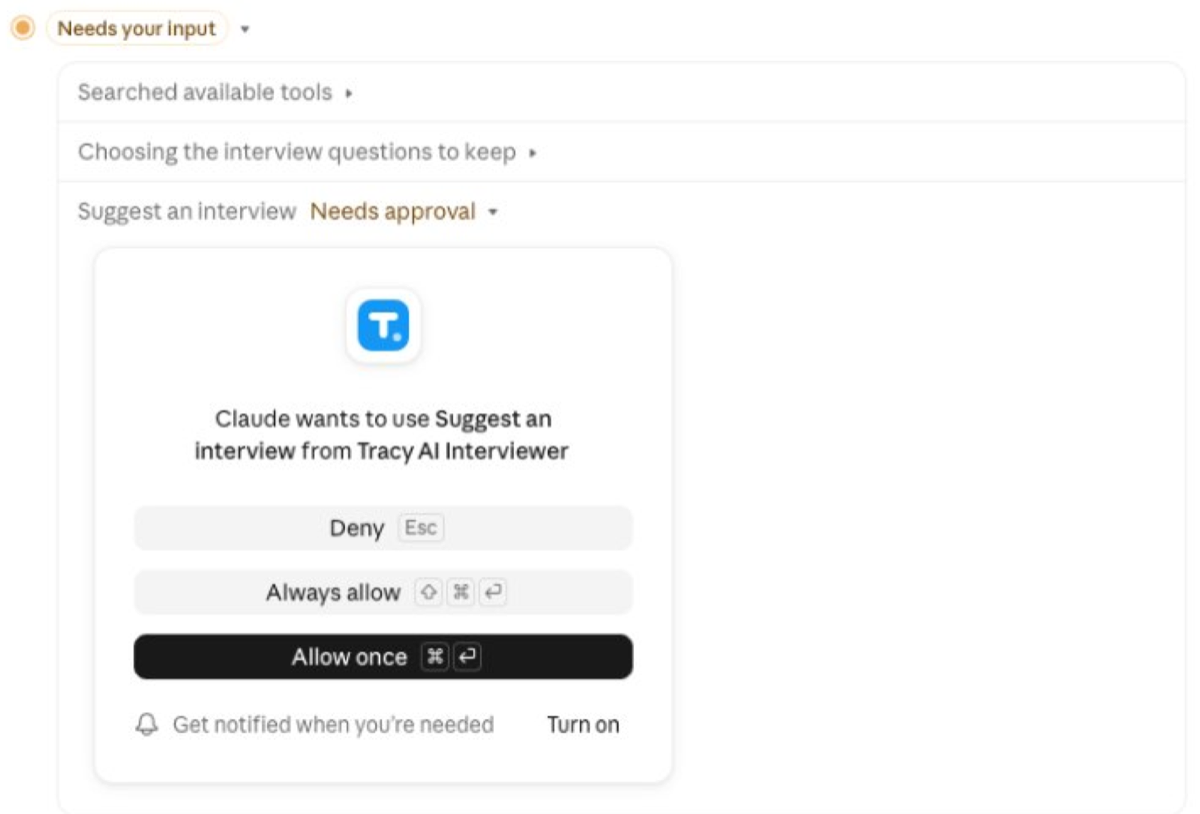
Claude stops and asks before it uses Tracy, so nothing is created without your yes.
Which prompt gets a usable interview draft?
One that names who you are talking to, what you want to learn and what you already know. Here is the prompt for the invoicing example:
Use Tracy AI Interviewer to set up a user interview for people who started a trial of our invoicing app in the last 60 days and did not pay. I want to learn what they tried to do in the first week and what stopped them. We already know the import step is slow, so skip that. Keep it to about 15 minutes. Show me the draft before you create anything.
Who you are talking to sets how Tracy words the opening. What you want to learn becomes the questions and the fields the results report on. What you already know keeps the interview off ground you have covered. Claude replies with a draft of the title, the questions and the result fields. Ask for fewer questions, a different order or a deeper style, and bring your own questions if you have them. Nothing exists until you approve. If you want help with the questions themselves, ten discovery questions, each with its follow-up, are in a list of discovery questions with follow-ups.
What does a follow-up look like in a user interview?
When a trial user says the app was too complicated, you learn nothing you can fix. Tracy asks which step it was, then asks about the first time it got complicated, and the answer becomes a specific moment you can open in the recording. The example below is invented, with timestamps, so you can see how the exchange is kept.
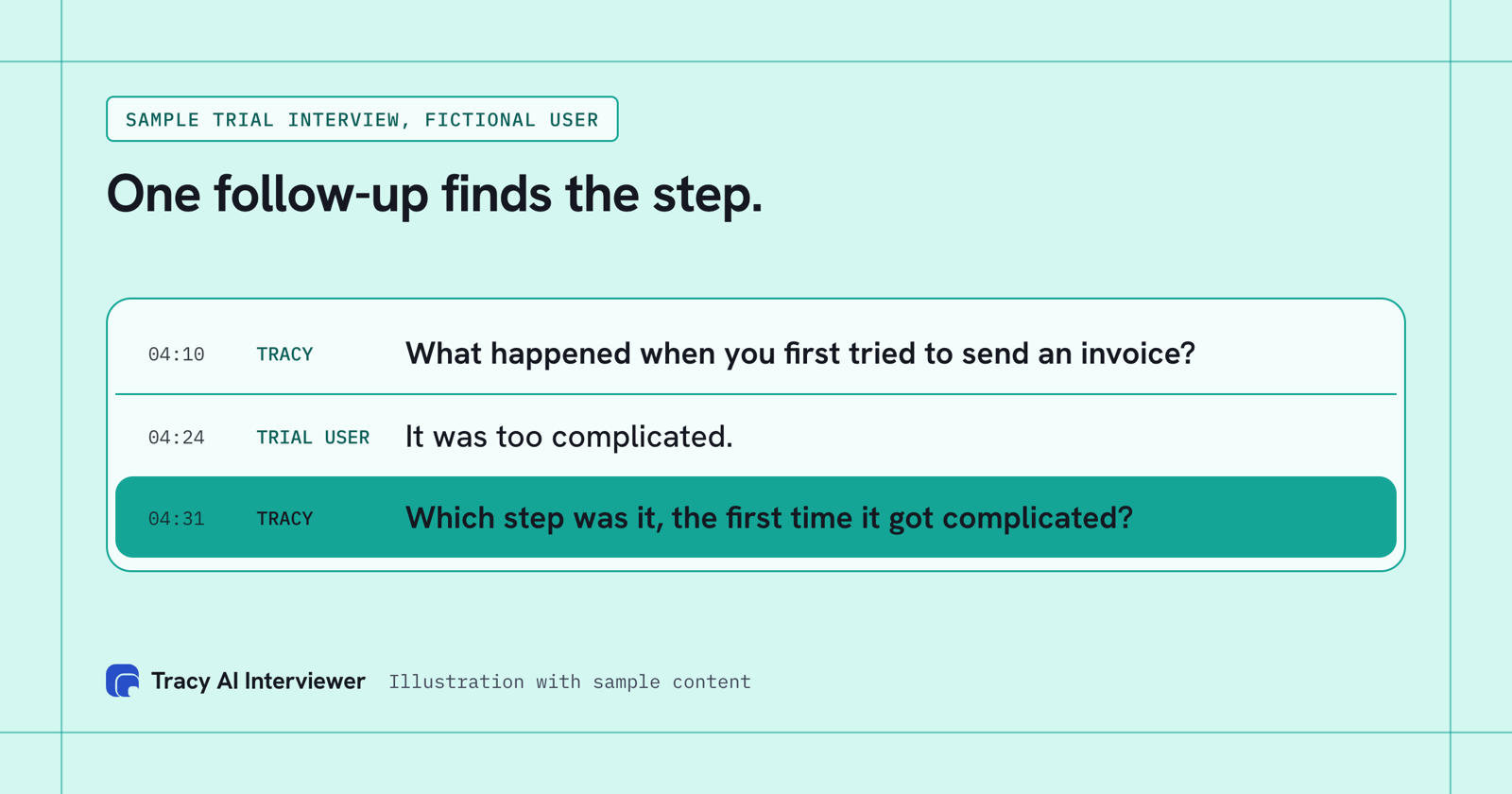
One follow-up turns "too complicated" into a specific step you can find in the recording.
The step a chat cannot do: talking to the users
Suppose 100 trial users agreed to talk. At 20 minutes each, 100 interviews are about 33 hours of live calls, and Claude cannot take one of them. Without a tool the guide stays a document and the 100 people stay unheard. With the connector you approve one draft and send one link, and each user starts when it suits them. The 33 hours stop being your calendar, and what stays with you is the reading.
How do you read the results back in the chat?
Send the link to the people you chose, from the chat or from Tracy. They open it in a browser, with no account, and the join screen tells them the conversation is recorded and transcribed. When people finish, you ask Claude in plain words:
- Who has finished, and who has not opened the link?
- What did people say stopped them in the first week?
- Which answers sound the same, and which disagree?
- Give me two clear quotes for each reason.
Claude reads back what Tracy returns. Treat that as a first read. Behind each result in Tracy sit the recording, a timestamped transcript and what the person said to each question, with the result fields you asked for. Open the transcript before a quote goes into a deck. Tracy reports what people said and does not score or rank them. For longer analysis, going from recordings to themes walks through it.
What stays with you?
Everything that needs judgement. You choose who to interview and what to learn, you read the draft because the questions are what every user will be asked, and you decide what the answers mean. A conversation with an account you cannot afford to lose is still better held by you, and so is anything where you need to watch someone use a prototype on screen; that is not stated on Tracy's pages. A mixed plan is common: you take the few high-stakes calls and the chat handles the rest. How to run customer interviews covers that split.
Cost is the same as the web app. It is $1 per credit, one credit per started 20 minutes, the first 3 results are free with no card, and a session with no answers is never charged. A hundred 20-minute interviews come to $100. The pricing page has the current plan.
Which path fits you?
- Researcher planning a full study: Claude for UX research.
- Product manager with a weekly calendar: Claude for product managers.
- Analysing interviews you already hold: Claude for qualitative research.
- Using ChatGPT instead: AI interviews in ChatGPT.
- Comparing interview tools: best AI-moderated interview platforms.
Common questions
Can Claude run user interviews?
Is there a Claude user interview tool?
Is there a Claude skill for user interviews?
Is Anthropic Interviewer available for my own research?
What does a user need to take part?
Can Claude see my other data through the connector?
Draft your first user interview in Claude
Add the connector, describe who to talk to and approve the draft. Tracy interviews each user. The first 3 results are free.
Try it free (opens in a new tab) Book a demo (opens in a new tab)
Your first 3 results are free. No card needed.
Sources
- Add Tracy AI Interviewer to Claude (public guide), retrieved 15 Nov 2026.
- Tracy AI Interviewer Connect page, retrieved 10 Nov 2026.
- Tracy AI Interviewer pricing, retrieved 11 Nov 2026.
- Anthropic: Get started with custom connectors using remote MCP, retrieved 14 Nov 2026.
- About Anthropic Interviewer, retrieved 14 Nov 2026.