In short
Claude handles the reading and writing in a recruiter's week: role briefs, outreach, CV checks against must-haves, interview kits. These 25 Claude prompts for recruiters are grouped by job. A chat cannot interview your applicants. Prompts 19 to 22 hand that to Tracy AI Interviewer through its Claude connector: Claude drafts, you approve, and Tracy interviews each person on video with follow-ups in their field. Claude and Tracy report what they read or heard, and a person decides, so no prompt here asks either to rank or reject anyone.
These Claude prompts for recruiters cover the work between an intake call and a shortlist: turning notes into a brief, finding people, writing to them, reading CVs against the must-haves and preparing interviews. Copy a prompt, swap the [brackets] and paste your own material under it. The last group hands the interview itself to Tracy AI Interviewer, so every applicant is interviewed rather than just read.
How to write a Claude prompt for recruiting
A prompt works when it says four things: the job, the material, the format and what to do when something is missing. Anthropic's guidance says XML tags "help Claude parse complex prompts unambiguously" when a prompt mixes instructions, context and inputs. For recruiters that means CVs and intake notes go inside tags such as <cv> or <notes>, and your instructions stay outside them.
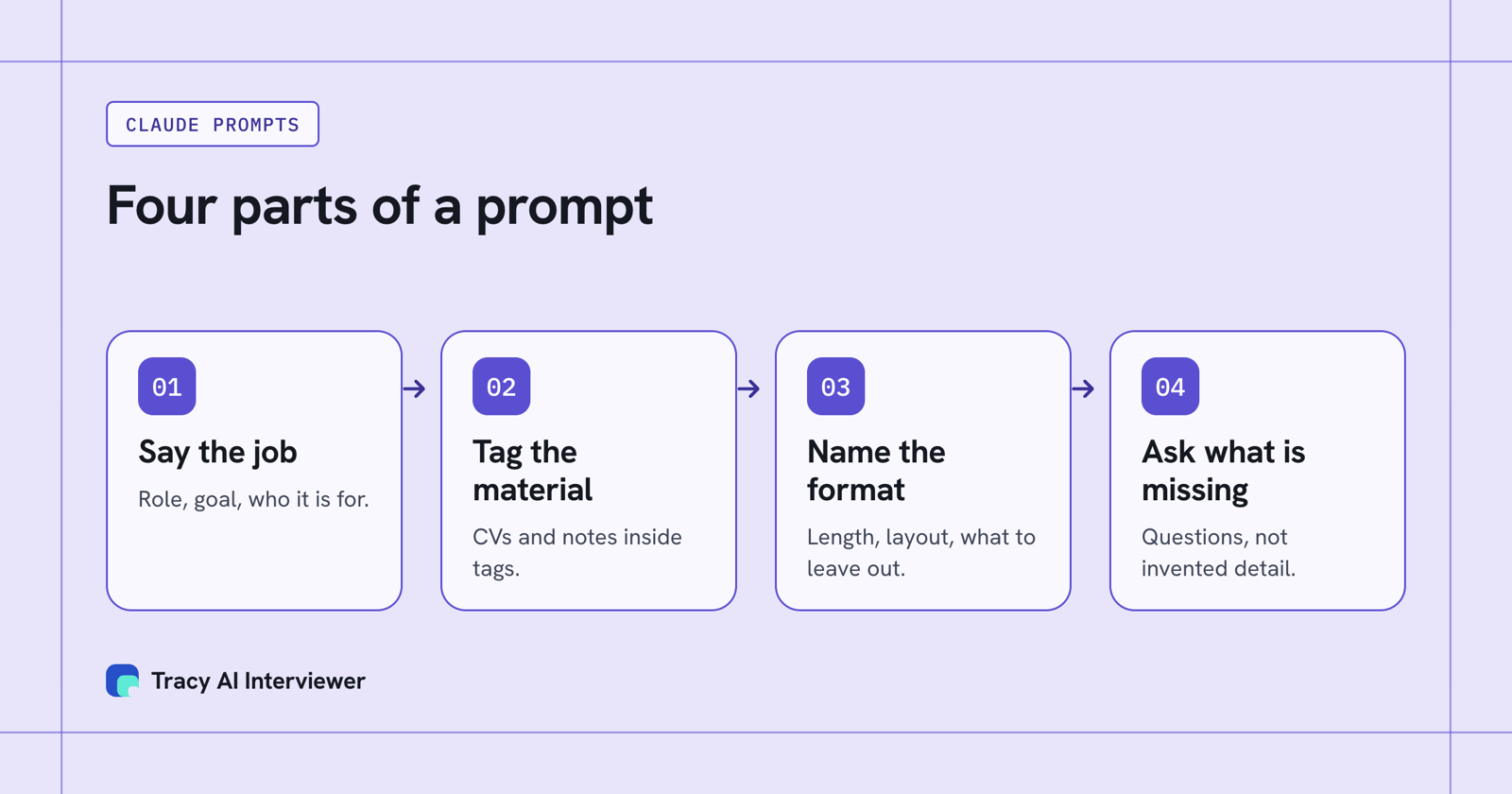
A good prompt names the job, tags the material, sets the format and asks for gaps.
Two habits strengthen every prompt below. Keep your standing context (company, tone, what you never write) in a Claude Project's instructions, and end important prompts with "Ask me what is missing before you answer." You get questions instead of invented detail.
Check anything Claude writes about a person before it goes out, and keep out candidate details you may not share.
Intake and job posts (1 to 4)
1. Intake brief from rough notes
Turn the notes in <notes> into a one-page role brief: the problem this hire solves, 3 must-haves, 3 nice-to-haves, 2 deal-breakers and what the first 90 days look like. Mark anything the notes do not say as "unknown". <notes>[paste]</notes>
2. Questions for the hiring manager
I am about to run an intake call for a [role]. Write 10 questions that separate what the manager needs from what they wish for. Include one about what the last person in this seat did well and one about what would make them regret the hire.
3. Job post from the brief
Write a job post from <brief>. Plain words, no more than 350 words, must-haves first, pay range included if it is in the brief. Do not add benefits or claims that are not in the brief. <brief>[paste]</brief>
4. Sort must-haves from nice-to-haves
Read <job-post> and list every requirement. Put each in one of three groups: must-have, nice-to-have, or filler that no interview could check. Suggest which filler lines to cut.
Sourcing (5 to 7)
5. Boolean strings from a brief
From <brief>, write 3 boolean strings for [LinkedIn Recruiter or your tool]: one narrow, one wide, one built on skills instead of titles. Say in one line what each one trades off.
6. Adjacent titles
List 10 job titles where people do most of what a [role] does but would not search for that title. For each, name the one skill gap I should ask about.
7. Reading a profile for fit
Read <profile> against <must-haves>. Quote the lines that match each must-have. List the must-haves the profile does not mention. Do not guess at ones it leaves out.
Outreach (8 to 11)
8. First message
Write a first message to <profile> about a [role]. Under 100 words. Open with one specific thing from their work, say what the role is in a sentence, and end with a question that needs a one-word answer.
9. Follow-up
They have not replied to <message> after 5 days. Write a follow-up under 50 words that adds one new fact about the role and makes it easy to say no.
10. Rewrite for a passive candidate
Rewrite <job-post> as a message to someone who is not looking. Lead with the problem they would solve, not the company history.
11. Reply to a pay objection
A candidate says the range is below what they earn. Draft three replies: one that asks what they need, one that explains how the range is set, and one that thanks them and leaves the door open. Do not promise anything I have not told you.
Reading CVs (12 to 15)
12. CV against must-haves, with quotes
Compare <cv> with <must-haves>. For each must-have, say "shown", "partly shown" or "not shown" and quote the CV line that supports it. Do not give an overall score and do not recommend rejecting anyone.
13. Gaps to probe
From the comparison above, write the 5 questions I should ask this person to check what the CV leaves open. Phrase them so they ask for a specific project, not an opinion.
14. A career changer
This CV moves from [field] into [role]. List the skills that carry over with the line that shows each, and the 3 things I should ask about that the CV cannot show.
15. Summary for the hiring manager
Summarise <cv> in five lines for a hiring manager: what they have done, what matches the brief, what is unclear. No adjectives like "strong" or "excellent". Do not rank them against anyone.
Interview prep (16 to 18)
16. A question set from the brief
From <brief>, write 8 structured interview questions, each tied to one must-have. Ask for a specific past situation. Put what a thin answer sounds like beside each.
17. Follow-ups for an answer
The candidate answered <question> with <answer>. Write three follow-up questions that ask for the missing detail: what they did themselves, what went wrong, what they would change.
18. Phone screen script
Write a 15-minute phone screen for a [role]: an opening, 5 questions from <must-haves>, a closing that says what happens next and when. Add a line on what to write down during the call.
Hand the interview to Tracy (19 to 22)
These four prompts work once the Tracy connector is added to Claude. Tracy AI Interviewer is reached over MCP, so Claude calls it and Tracy runs the interview. Creating an interview and inviting people each need your approval of a preview first. A new interview starts with its public link on (anyone with the link, up to 20 people for 14 days) and nobody invited; you can turn the link off.
19. Draft the interview
Use Tracy AI Interviewer to set up a screening interview for [role] candidates. Base the questions on <brief>. Show me the draft before you create anything.
20. Rework the draft
Cut the draft to five questions. Make question 3 ask for one specific incident. Keep my question about notice period word for word. Show the new draft.
21. Invite people
Invite these people to the interview: [email addresses]. Show me the invitation first and send nothing until I say yes.
22. Read where it stands
Who has finished the [role] interview? For each person who has, give what they said about [must-have 1] with the timestamp, and note anything a person should look at. Do not rank them.
Below is a real draft from Tracy's connector, returned on 14 Nov 2026 for a short brief for a tier 2 technical support engineer role. Nothing was saved and nobody was invited. Draft returned by Tracy: technical support engineer interview
- Can you describe a recent technical problem a customer had and how you approached solving it?
- How do you use debugging logs and API error messages when troubleshooting issues?
- Tell me about a time you had to explain a technical problem and solution to a customer who was frustrated or upset.
- What steps do you take to stay calm and effective when dealing with high-pressure or difficult customer situations?
- Is there anything else you want to share about your experience or approach to technical support?
The result fields were Problem solving approach, Use of debugging tools, Communication skills and Handling pressure. Question 5 is the kind of line prompt 20 is for.
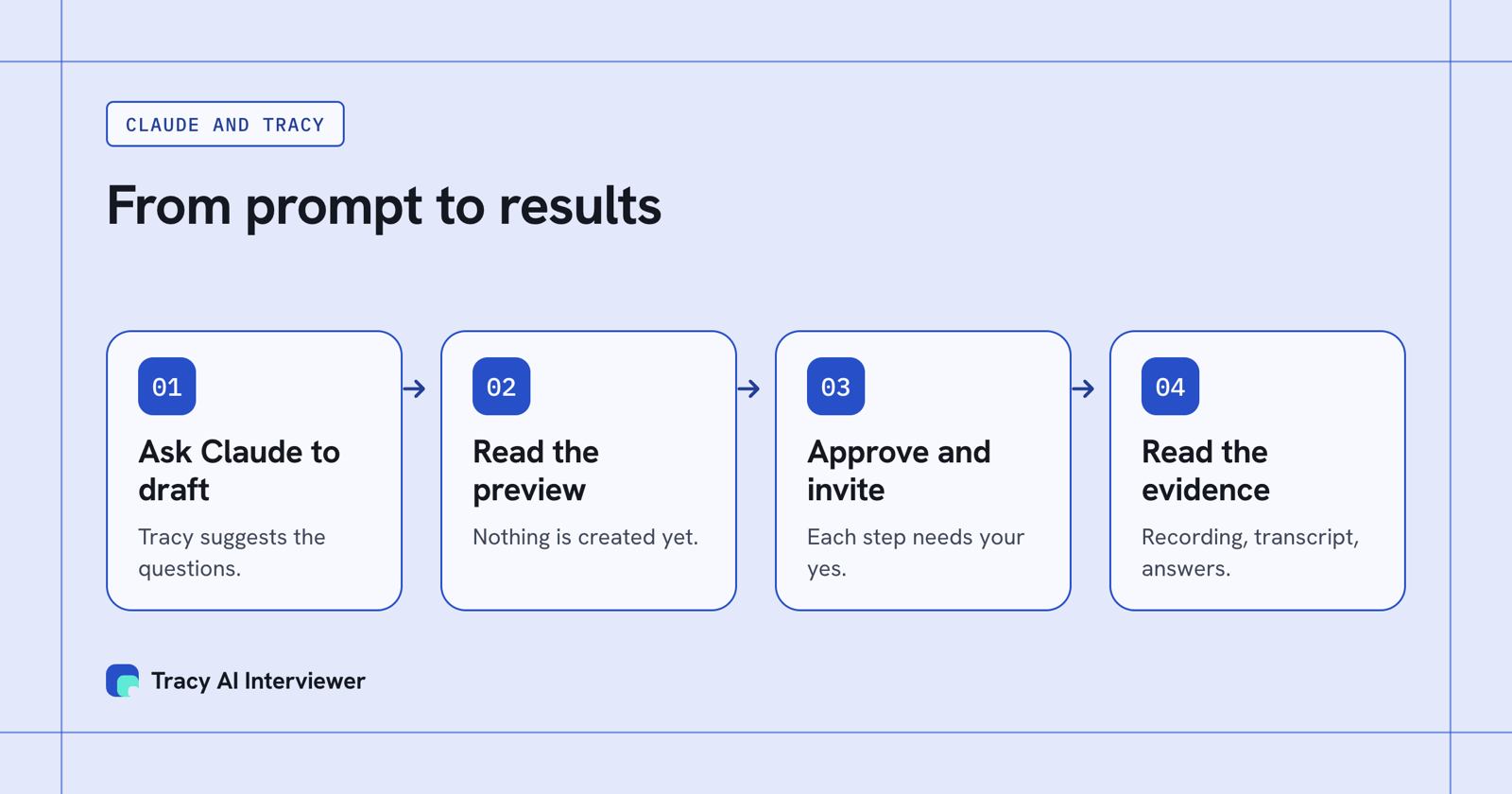
Claude drafts and Tracy interviews; each step waits for your approval.
Once people have finished, each result has a recording, a timestamped transcript and a written assessment per question. Video interviews also show integrity signals to the reviewer. They are a reason to look, never proof, and the reviewer decides.
After the interviews (23 to 25)
23. Submittal from the evidence
Write a client submittal for <name> from <result>. Use only what the person said, with timestamps. Put anything the result does not cover under "to confirm". Do not recommend a hire or a rejection.
24. Compare evidence without ranking people
Compare <results> against <scorecard>. For each criterion, quote the relevant words and timestamps for each person, then list what the interviews did not cover. Do not rank, recommend or infer.
25. Brief the hiring manager on the next interview
Write a one-page hiring manager brief from <results>: evidence already collected, unresolved questions and what the next interview should test. Keep every claim linked to the person's words and timestamp. Do not make the final decision.
Which path fits you
- A phone screen before the interview: the phone screening script.
- Writing the job post first: Claude job description prompt.
- Working in Claude every day: Claude for recruiting.
- Many applicants for one role: hiring at volume.
- Using ChatGPT instead: the ChatGPT guide.
Common questions
What are good Claude prompts for recruiters?
Can Claude read a CV against my must-haves?
Does Claude work with Tracy?
Does Tracy score or reject candidates?
Connect Tracy and run prompt 19
Add the connector, then ask Claude to draft an interview for one open role. The first 3 results are free.
Try it free (opens in a new tab) Book a demo (opens in a new tab)
Your first 3 results are free. No card needed.
Sources
- Add Tracy AI Interviewer to Claude (public guide), retrieved 14 Nov 2026.
- Anthropic: prompting best practices, retrieved 14 Nov 2026.
- Anthropic: custom connectors using remote MCP, retrieved 14 Nov 2026.
- Tracy AI Interviewer, suggest_interview draft (tool call), retrieved 14 Nov 2026.