In short
Claude plugins for HR start with Anthropic's Human Resources plugin: six skills and six commands for recruiting stages, onboarding, performance reviews, compensation and policy questions. None is listed as running a conversation with an employee or a candidate. Tracy AI Interviewer adds that as a connector: Claude drafts a check-in or exit interview, Tracy interviews each person on video, and your team reads what each said and decides.
What Claude plugins for HR cover
Anthropic publishes a Human Resources plugin for Claude Cowork, and it is part of the knowledge-work-plugins collection on GitHub. Its marketplace page describes it as covering "recruiting, onboarding, performance reviews, compensation analysis, and policy guidance" and gives four sample prompts: a performance review summary, a pay benchmark, a 30-60-90 day onboarding plan and a PTO policy summary.
The plugin writes the check-in questions; it does not ask them. The marketplace page stops there. It lists no skills, no connectors, no requirements and no caveats. The detail is in the repository: six skills (recruiting-pipeline, employee-handbook, compensation-benchmarking, org-planning, people-analytics, interview-prep) and six commands (/draft-offer, /onboarding, /performance-review, /policy-lookup, /comp-analysis, /people-report). The README names connector categories, among them HRIS, ATS, compensation, chat, calendar and email, with examples such as Workday and Greenhouse. Which of those the plugin's .mcp.json switches on is not stated, so check that after you install it.
What each option gives an HR team, from Anthropic's README table and Tracy's Connect page.
| Plugin or connector | What it gives HR | Where it comes from |
|---|---|---|
| Human Resources plugin | Six skills and six commands for HR documents and questions | Anthropic, knowledge-work-plugins |
| Enterprise search plugin | Lists connectors for Slack, Notion, Guru, Jira, Asana and Microsoft 365 | Anthropic, README table |
| Productivity plugin | Lists connectors for Slack, Notion, Asana, Linear, Jira, Monday, ClickUp and Microsoft 365 | Anthropic, README table |
| Plugins you build | Skills, connectors and commands as markdown and JSON, no code | Your team, per Anthropic |
| Tracy AI Interviewer connector | Check-ins, exit interviews and other conversations, run on video | Tracy, remote MCP server |
What is the difference between a plugin, a skill and a connector?
A skill is instructions Claude loads when a request matches it. A connector gives Claude access to an outside tool through MCP. A plugin is the package: Anthropic says each plugin bundles skills, connectors and sub-agents, and its repository adds slash commands. Plugins in Cowork are on all paid plans, and Anthropic notes that hooks and sub-agents run in Cowork and Claude Code, not in chat. The short version of the first two is in MCP vs skills, and writing your own HR skills covers the skills you build yourself.
The HR plugin's commands help with documents. Any step that needs a conversation, such as a 30-day check-in or an exit interview, needs a connector to a tool that runs one.
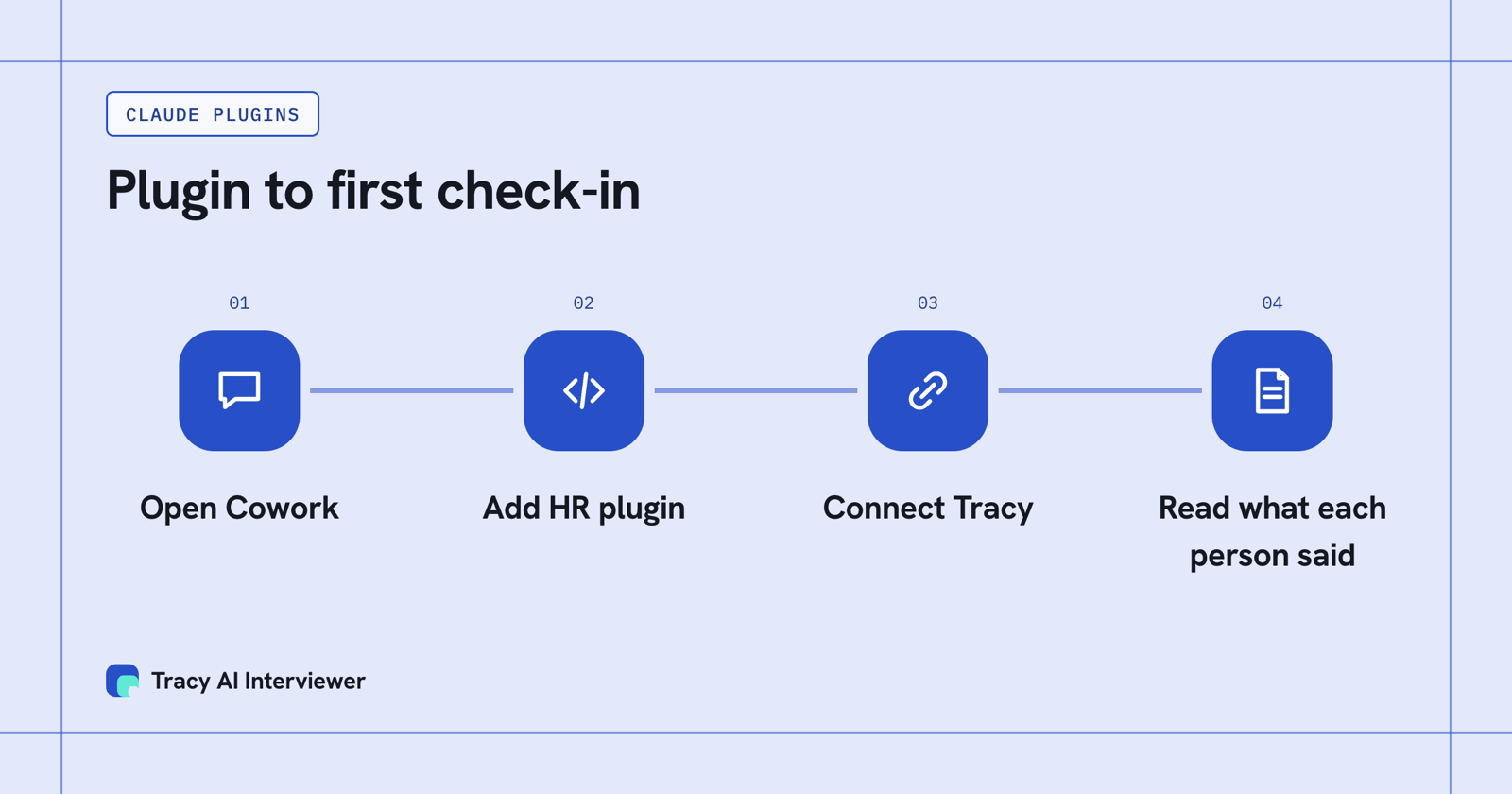
Install the plugin in Cowork, then add the connector for conversations.
How do you install the HR plugin?
In Cowork, open the Cowork tab, then Customize, then Plugins, check Discover, pick the plugin and click Add. Typing / or using the plus button shows the plugin's skills, and you run a command as /plugin-name:command. In Claude Code, add the marketplace with claude plugin marketplace add anthropics/knowledge-work-plugins, then install a plugin with claude plugin install <name>@knowledge-work-plugins, which for this plugin follows the README's pattern with human-resources as the name.
Two limits matter at work. Plugins your organisation manages cannot be edited, and required plugins cannot be turned off; on Enterprise, an admin may customize which plugins are available to each group. And a plugin may include local MCP servers that run on your computer, so ask IT before you install one that is not from Anthropic. Treat plugins from public directories as unreviewed code.
Does the HR plugin run check-ins or interviews?
Not as listed. Its interview-prep skill builds structured plans with competency-based questions, scorecards and debrief templates, which is preparation, and none of the six skills or six commands is described as running an interview. For check-ins, exit interviews, engagement conversations and candidate interviews, connect a tool that runs them.
Tracy AI Interviewer is a connector for that: a remote MCP server at tracyinterview.ai/mcp. You describe the conversation to Claude: an onboarding check-in, an engagement round or an exit. For example: "Use Tracy AI Interviewer to draft a 30-day check-in for new support hires." Tracy drafts questions, you edit them or bring your own, and nothing is created until you approve the preview.
Set-up steps are in the Claude connector setup, how to add MCP to Claude and a Cowork setup for recruiters. Anthropic lists Cowork among the places custom remote connectors work, so the same server address applies there. Question lists are in 30-60-90 day check-in questions and exit interview questions.
What a plugin leaves open: the conversation itself
A plugin command can draft the check-in questions. Someone still has to ask them and follow up. Say 100 new hires each get a 30-day check-in of 20 minutes: about 33 hours of calls for an HR team. With Tracy each person joins in a browser when it suits them. Tracy says who she is and what happens next, and people are told about the recording before it starts. When an answer is vague she asks a kind, sharper question. Asking Claude for results brings back what each person said to each question and the result fields. Grouping answers into themes is done by Claude or the reviewer, not by Tracy. A person reads it and decides what to do.
What Tracy adds to Claude's HR plugin
- Reach every person. Each person starts on click, at any hour, with no scheduling and no one from HR on the call.
- Ask the next question. Tracy follows the answer in the person's own field and waits for it, so a vague reply to a check-in question gets a follow-up.
- Keep the evidence. Every result has a recording, a timestamped transcript and a written assessment per question with its reasoning, and the recording stays in Tracy behind each answer.
Tracy does not score people or reject anyone. MCP access is included in Pay as you go, at $1 per credit. For HR conversations, Tracy is SOC 2 Type II attested, with the report on request at hello@tracyinterview.ai.
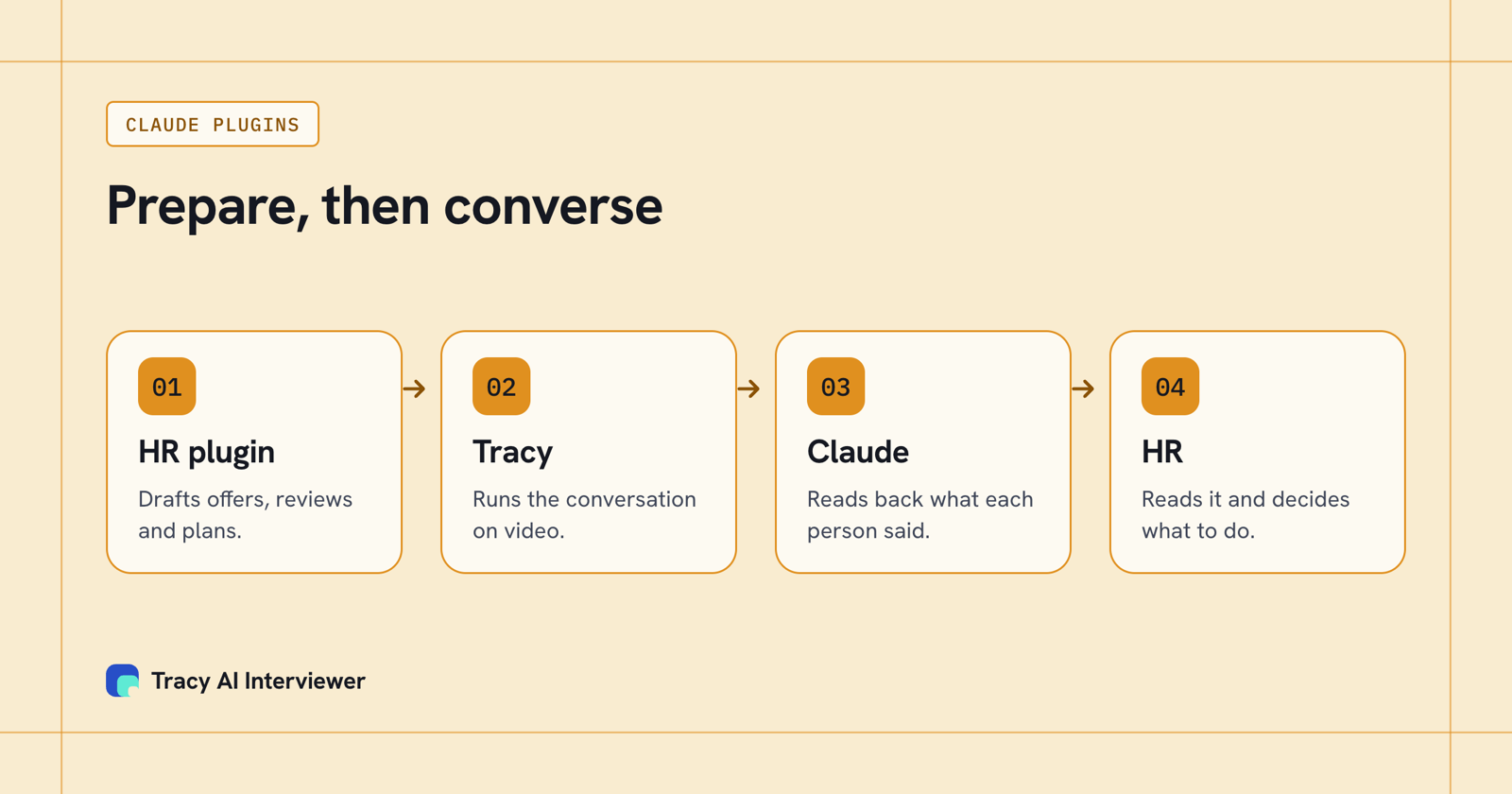
The plugin prepares HR work, the connector runs the conversation, and HR reads the results and decides.
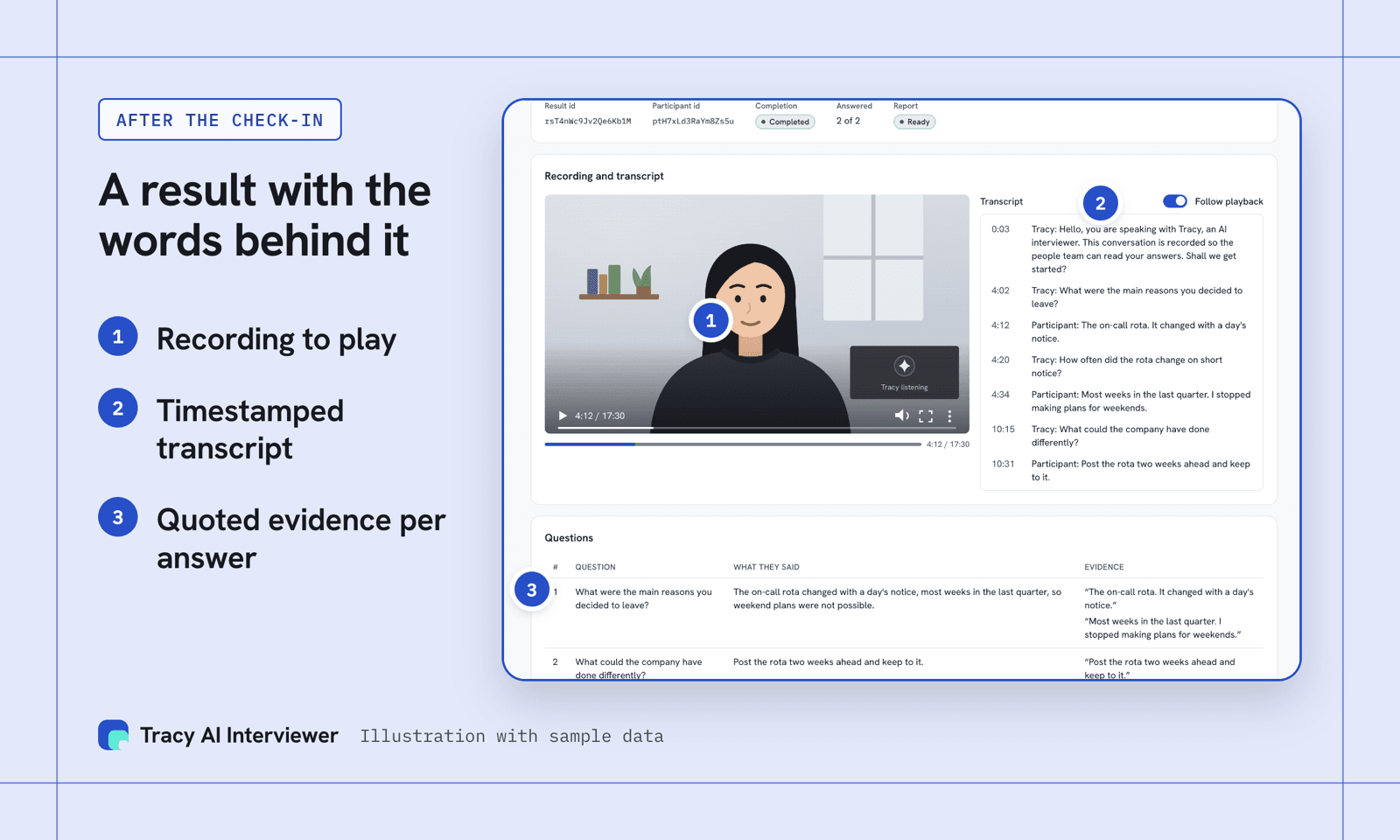
Behind each answer in the chat, the result keeps a recording, a transcript and quoted evidence.
Which path fits you
- People teams running check-ins and exit interviews: Tracy for people teams and AI interviews for people teams.
- HR leads still choosing between skills and plugins: skills versus plugins for HR.
- Day-to-day Claude use for HR: Claude for HR professionals.
- New to the connector idea: the basics of MCP connectors.
Common questions
What is the Claude HR plugin?
Is there a Claude AI HR plugin on every plan?
Does the HR plugin run interviews?
Can I use the HR plugin in Claude Code?
Is it safe to install HR plugins from public directories?
Does Tracy score employees in a check-in?
Connect Tracy and run one check-in
Connect Tracy to Claude and ask for one check-in. You approve the draft before anyone is invited. The first 3 results are free.
Try it free (opens in a new tab) Book a demo (opens in a new tab)
Your first 3 results are free. No card needed.
Sources
- Anthropic: Human Resources plugin, retrieved 14 Nov 2026.
- Anthropic knowledge-work plugins: human-resources, retrieved 14 Nov 2026.
- Anthropic knowledge-work plugins: README, retrieved 14 Nov 2026.
- Anthropic help center: Use plugins in Claude Cowork, retrieved 15 Nov 2026.
- Add Tracy AI Interviewer to Claude (public guide), retrieved 14 Nov 2026.