In short
Tracy AI Interviewer leads for recruiters who interview. From a ChatGPT message it drafts an interview from a role description, invites people and reads back what each one said to each question.
The ATS apps follow, in order of how much of the hiring record each one documents: Workable, Ashby, Greenhouse, then Zoho Recruit and HiBob.
Each app acts as the person signed in, and ChatGPT may ask before it reads or changes anything.
Start with Tracy's Install in ChatGPT button and send one prompt for a role.
The best ChatGPT apps for recruiters are the ones that sit where candidates already are: your applicant tracking system, your HR system and the interview itself. This list has six, on one rule. Tracy leads because it is the one entry here that conducts the interview rather than storing its record. The rest are ordered by how much of the hiring record each one documents for ChatGPT, and each entry says why it sits where it does. If MCP is new to you, how an MCP server works explains what sits behind each app, and ChatGPT for recruiting covers where chat fits in a hiring workflow.
What a recruiter needs from a ChatGPT app
OpenAI describes apps as connections between ChatGPT and services you already use, set up under Settings > Plugins and called into a chat with @. Five things matter for hiring work:
- It opens the record you work in. An app earns a place when your candidates, jobs or interviews are already in that service.
- It acts as you. Ashby uses user-level OAuth, Workable scopes each session to the signed-in user's role, and Zoho Recruit follows existing roles and permissions.
- It asks before it acts. ChatGPT may ask for approval before reading or completing an action, and you set how often.
- An admin can control it. In ChatGPT Business many apps are on by default, and administrators can change workspace access.
- A person can check what it produced. The result should show what was said, not only a verdict.
| App | Best for | What it does in ChatGPT | Status |
|---|---|---|---|
| Tracy | Running interviews | Draft, invite and read back results | Install in ChatGPT on its Connect page |
| Workable | ATS pipelines | Jobs, candidates, stages, offers, employees | On all plans; 94 tools |
| Ashby | ATS and interviews | Pipeline, profiles, jobs, interviews, transcripts | Open beta, all plans |
| Greenhouse | ATS administrators | Read-only scopes by default | Open beta; Core, Plus, Pro |
| Zoho Recruit | Zoho shops | Candidate records and pipelines | |
| HiBob | People teams | People data, time off, hiring where on |
Scroll the table sideways to see all 4 columns.
What each app does in ChatGPT, from OpenAI's and each vendor's own pages, read on 22 November 2026.
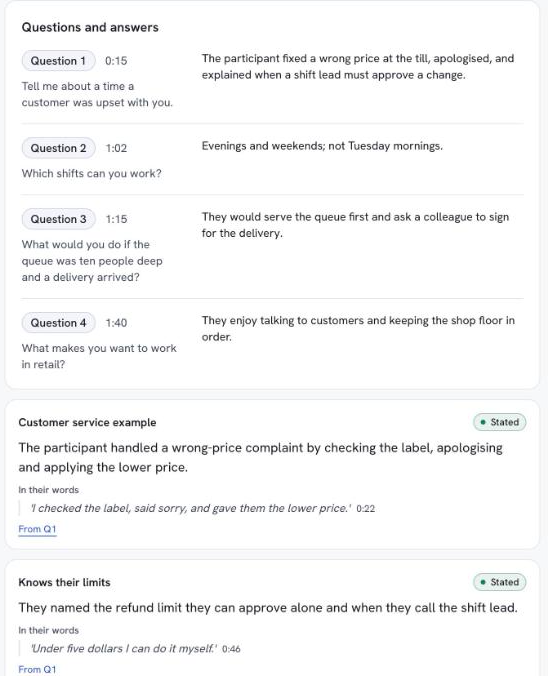
What comes back into the chat is what each person said to each question, with their own words.
The shortlist, in order
1. Tracy AI Interviewer (for interviews)
- Verdict: Runs the interview itself on video and brings back, into the chat, what each person said to each question, the result fields and a note for your ATS.
- Best for: Teams that screen candidates, or run customer and employee interviews, and want to start from a message.
- Trade-off: It covers interviews only; your ATS app still holds the pipeline.
- Price: The first 3 results are free; after that a credit is $1 and there are no seats to buy.
Here is the kind of note that comes back, from an invented software engineer screen.
Question: Tell me about a service you owned in production.
Summary: The candidate owned a payments retry service and moved it from cron jobs to a queue.
Quote, 02:10: "I moved the retries onto a queue so one slow call stopped blocking the rest."
Tracy's follow-up: What happened to duplicate payments when a retry fired twice?
This is sample data. The reviewer reads the evidence and makes the call; Tracy keeps to reporting what was said.
2. Workable
- Why second: It documents the widest coverage of the ATS apps. Workable says it covers jobs, candidates, pipeline stages, offers, requisitions, employees, events and time off, and its August 2026 post counts 94 tools.
- Best for: Teams already on Workable that want pipeline questions answered in chat.
- Trade-off: Advanced candidate and employee search needs Premier+ or Enterprise. OpenAI says availability depends on plan, workspace and admin approval.
- Price: Workable lists it as part of every plan, with no extra charge.
3. Ashby
- Why third: OpenAI's page lists pipeline, candidate profiles, open jobs, interviews and transcripts, plus notes, stage moves and emails from the chat. That is a long list, with fewer record types than Workable's.
- Best for: Teams on Ashby that want its data and a few actions in ChatGPT.
- Trade-off: It is in open beta. Access is user-level OAuth, so ChatGPT can do only what you can do in Ashby.
- Price: Available on all Ashby plans.
4. Greenhouse
- Why fourth: It documents how access is limited (read-only scopes by default) more than what the chat can reach, so it sits below the two apps that list their record types.
- Best for: Greenhouse teams where a Site Admin wants to set the limits first.
- Trade-off: Open beta; a Site Admin sets it up, and other users connect within the limits the admin sets.
- Price: Core, Plus and Pro tiers.
5. Zoho Recruit
- Why fifth: Zoho names ChatGPT among the AI tools that can use its server and says it follows existing roles and permissions, but the page gives no list of what a recruiter can do there.
- Best for: Teams on Zoho Recruit.
- Trade-off: Its setup guides cover Claude, Cursor, VS Code and Windsurf, so expect to read the general MCP steps for ChatGPT.
- Price: See Zoho's page; it offers a free sign-up.
6. HiBob
- Why last: It supports ChatGPT, Claude.ai, Claude Desktop and Cursor with read and write actions where Bob already allows them, but hiring is only one slice of a people-data tool.
- Best for: People teams that keep hiring and people data in HiBob.
- Trade-off: Hiring is covered only where that module is on and permitted for the person signed in.
- Price: See HiBob's page.
Where Tracy fits in a recruiter's ChatGPT
Tracy lets ChatGPT start an interview with a candidate. Ask for a screening interview for a senior backend engineer role, read the drafted questions and edit them or bring your own, then approve the preview Tracy shows before anything is created. From there each person interviews in a browser on video, at any hour, with follow-ups in their own field.
A new interview starts with its public link on, open to up to 20 people for 14 days, and you can turn it off. Video interviews also run integrity signals unless you switch them off: the full-screen window, the face on camera and a pop-up if the face leaves the frame. Tracy only passes them to a person. The join screen tells each candidate the conversation is recorded and transcribed. For where Claude fits instead, see Claude for recruiting.
The Install in ChatGPT button on Tracy's Connect page is the place to begin.
Is it safe to put candidate data in ChatGPT?
It depends on the plan, the app and what you send. OpenAI says that for ChatGPT Business, Enterprise and Edu it does not use information accessed from apps to train models by default. For Free, Plus, Go and Pro it may, if "Improve the model for everyone" is on. Data shared with an app follows that app's terms and privacy policy.
Three habits keep the risk down. Connect through your admin where you can, so workspace controls apply. Keep an app's permission set to ask before it writes. And keep a person deciding: the UK Information Commissioner's Office audited several AI recruitment tool providers in 2024 and made almost 300 recommendations, such as keeping personal information to a minimum and telling candidates how an AI tool uses their information. See ChatGPT resume screening for what to keep out of a prompt.
How to add an app, and when you need a custom server
- Open Settings > Plugins in ChatGPT and select the app, or open its Install in ChatGPT button from the vendor.
- Sign in to the service and approve the permissions it asks for.
- In a new chat, type @ and pick the app, or select + and choose it.
- Set when ChatGPT asks before it reads or acts.
A server that is not in the directory is a custom MCP server. OpenAI says full MCP support is for ChatGPT Business and Enterprise/Edu on the web, that on Business only admins and owners can create and publish them, and that Pro users can connect custom servers with read and fetch permissions. ChatGPT connects to remote servers, so a server on a laptop needs a tunnel. See how to add MCP to ChatGPT and ChatGPT apps vs connectors.
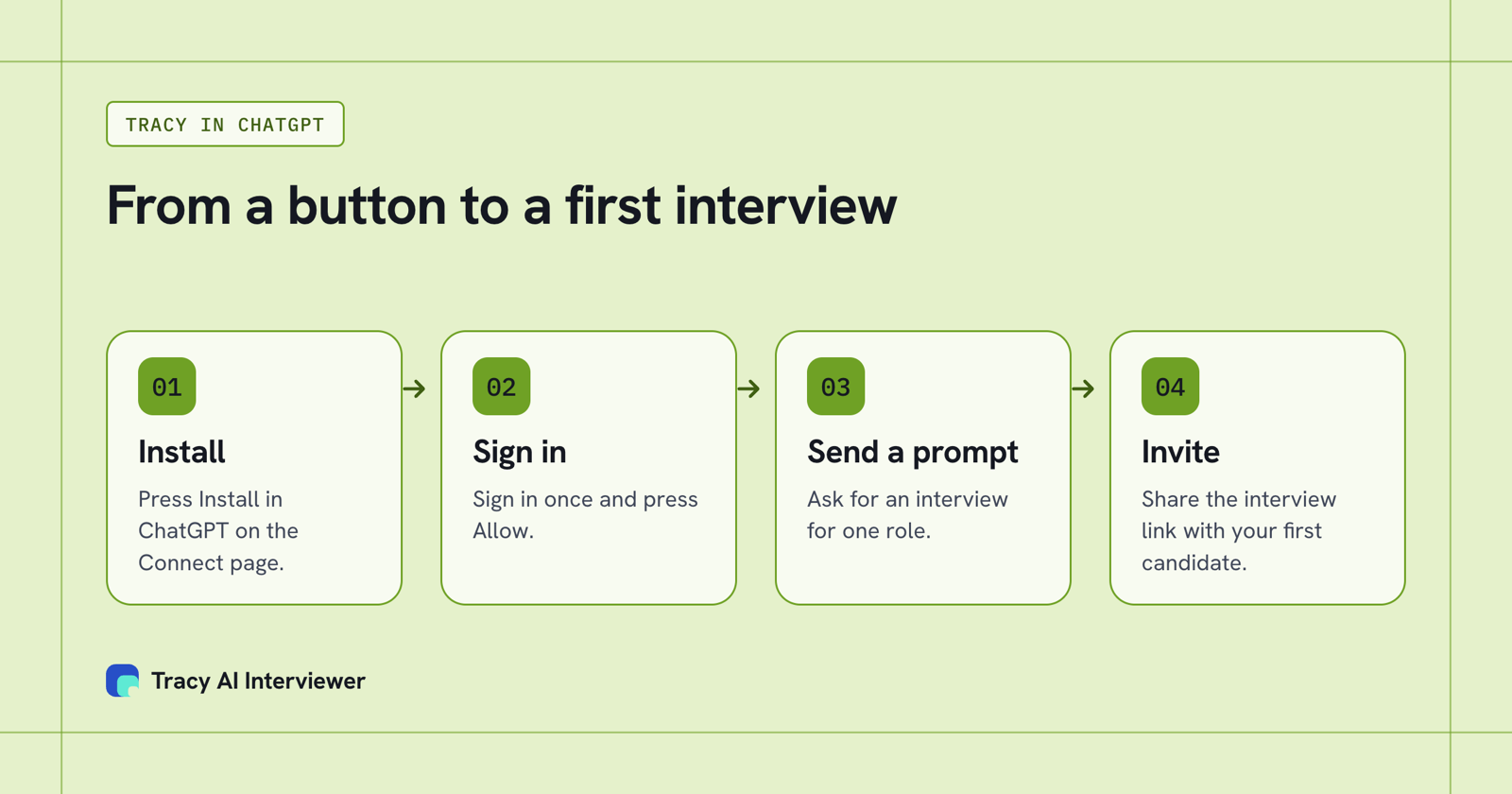
Four moves take Tracy from a button to an interview sent to your first candidate.
How can recruiters use ChatGPT with these apps?
Recruiters hand ChatGPT the reading and drafting around a hire and keep the decision. With an ATS app that can mean summarizing a pipeline, preparing an interview brief or reviewing open roles. With Tracy it means turning a role into an interview, reading what people said and carrying the note back to the ATS. For prompts to start from, see ChatGPT prompts for recruiters and ChatGPT for sourcing candidates.
Common questions
Which ChatGPT apps are best for recruiters?
How can recruiters use ChatGPT?
Which ChatGPT prompts work for recruiting?
Is it safe to put candidate data in ChatGPT?
Do I need ChatGPT Business for these apps?
Can Tracy rank or reject candidates from ChatGPT?
Run your first interview from ChatGPT
Install Tracy in ChatGPT, send one prompt for a role and approve the preview. First 3 results free.
Book a demo (opens in a new tab) Try it free (opens in a new tab)
Your first 3 results are free. No card needed.
Sources
- OpenAI Help Center, Connected apps in ChatGPT, retrieved 22 Nov 2026.
- OpenAI Help Center, Connecting custom MCP servers in ChatGPT, retrieved 22 Nov 2026.
- UK ICO, AI recruitment tools audit outcomes (Nov 2024), retrieved 19 Nov 2026.
- Tracy AI Interviewer, Connect, retrieved 22 Nov 2026.