In short
To add MCP to ChatGPT, open Plugins, add a custom MCP server with its HTTPS address, pick the sign-in and install it. ChatGPT then calls the server with @ and asks for confirmation before write actions. Tracy AI Interviewer is the worked example: ChatGPT drafts a video interview, Tracy interviews each person, and you approve the preview and read what each said. Your team decides.
To add MCP to ChatGPT, you add the server's address as a custom MCP server on the ChatGPT Plugins page, then install it and call it with @ in a chat. The steps below follow OpenAI's documentation as of 14 Nov 2026, with Tracy AI Interviewer's server, https://tracyinterview.ai/mcp, as an address you can paste. If MCP is new to you, what an MCP server is is a short read first.
Adding the server gives ChatGPT a new tool. With Tracy, the new tool is an interviewer that talks to the candidate in a browser while you stay in the chat.
What a custom MCP server gives ChatGPT
ChatGPT supports both read and write tools through a custom server. It asks for confirmation on write actions by default, lets you turn individual tools on or off, and applies your workspace's controls. What a chat still lacks is a way to talk to people.
Before you start
- A public HTTPS address. A server like this is a remote MCP server. OpenAI says the server must be reachable through a public HTTPS endpoint or a Secure MCP Tunnel. Public endpoints support streamable HTTP, typically at /mcp, and SSE is also supported.
- ChatGPT on the web. The add flow is on the Plugins page at chatgpt.com/plugins.
- Permission from your workspace. OpenAI says workspace permissions and security restrictions, including Lockdown, apply to adding and using custom MCP servers, and account and workspace policies apply. On plans, the sources differ. OpenAI's help article (14 Nov 2026) says custom MCP server connections and full MCP support are available for ChatGPT Business and Enterprise/Edu customers on ChatGPT web. Its pricing page (15 Nov 2026) lists Developer mode (beta) on Plus and Pro. Check your own plan, and ask your workspace admin if the option is missing.
- A server you trust. OpenAI says only to connect to MCP servers you trust, and notes that custom servers are not developed or verified by OpenAI.
How to add a custom MCP server to ChatGPT
- Open ChatGPT Plugins at chatgpt.com/plugins, on the web.
- Select the plus button, then Add custom MCP server.
- Enter a user-facing name and, if you like, a description. For Tracy, use
Tracy AI Interviewer. If the name is taken, choose another. - Under Connection, enter the server address with its /mcp path:
https://tracyinterview.ai/mcp. - Configure authentication. OpenAI lists OAuth, no authentication, or a mix. For Tracy, select OAuth.
- Read the risk warning and select I understand and want to continue.
- Select Create as a plugin and review the tools ChatGPT discovered.
- Install the plugin, sign in to Tracy when asked and approve access.
- Start a new chat, type
@, select Tracy AI Interviewer and send your prompt.
On Developer mode, the sources differ. OpenAI's current help article says that in the current Plugins experience you don't need to turn on Developer Mode first. Its pricing page lists Developer mode (beta) on Plus and Pro. Tracy's ChatGPT guide says to turn on Developer mode in your ChatGPT settings if you do not see the option to add a custom MCP server. Check your own plan and settings. If the option is still missing, a workspace policy may be blocking custom servers, so ask an admin to allow them.
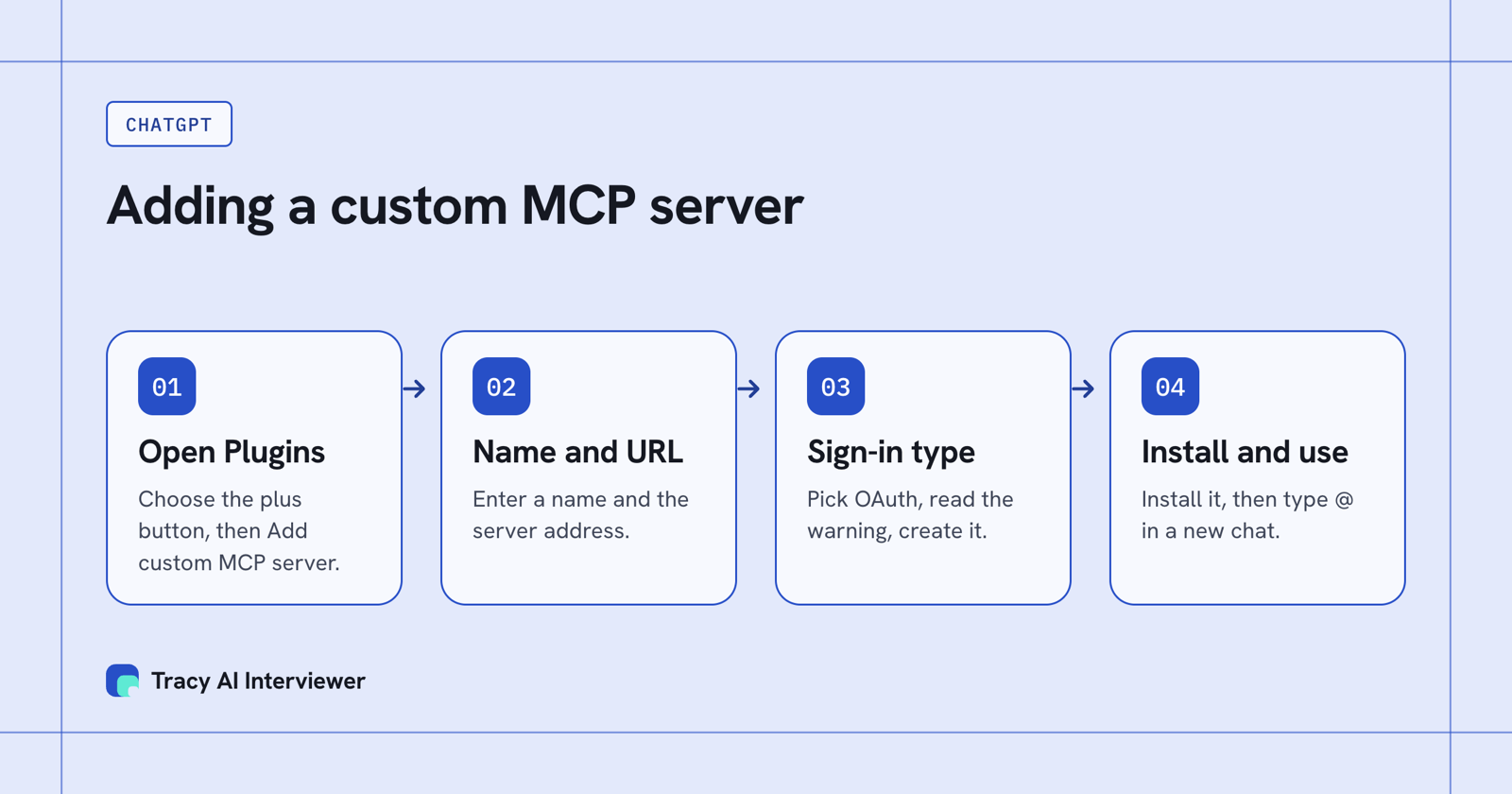
Four moves add a server: open Plugins, name it, pick the sign-in, install it.
Use Tracy in ChatGPT
Once Tracy is installed, ask for a practice interview first, for example "@Tracy Draft a practice video interview with three questions about a recent project." ChatGPT replies with a preview, and nothing is created until you approve it. Invitations are previewed too, and not sent until you approve them. A new interview then starts with its public link on (anyone with the link can join, up to 20 people for 14 days) and nobody invited, and you can switch the link off. Tracy in ChatGPT has the Tracy-specific walk-through, and the same server works in Claude: see how to add MCP to Claude.
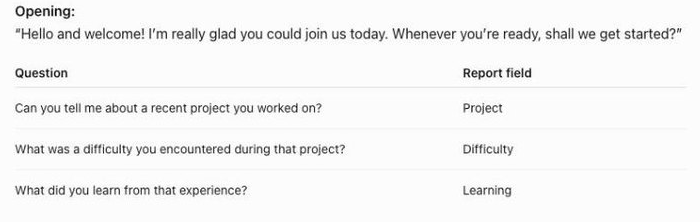
ChatGPT shows each question and the report field it feeds before anything is saved.
What you run in ChatGPT and where the interview happens
A custom server gives you the controls. The interview itself happens somewhere else. In ChatGPT you draft the interview, read the preview, approve the invitations and ask who has finished. Each applicant opens a link in a browser and talks to Tracy on video, with follow-ups in their own field, so you never schedule a call. If 100 people each take 20 minutes, that is about 33 hours of live calls you do not book.
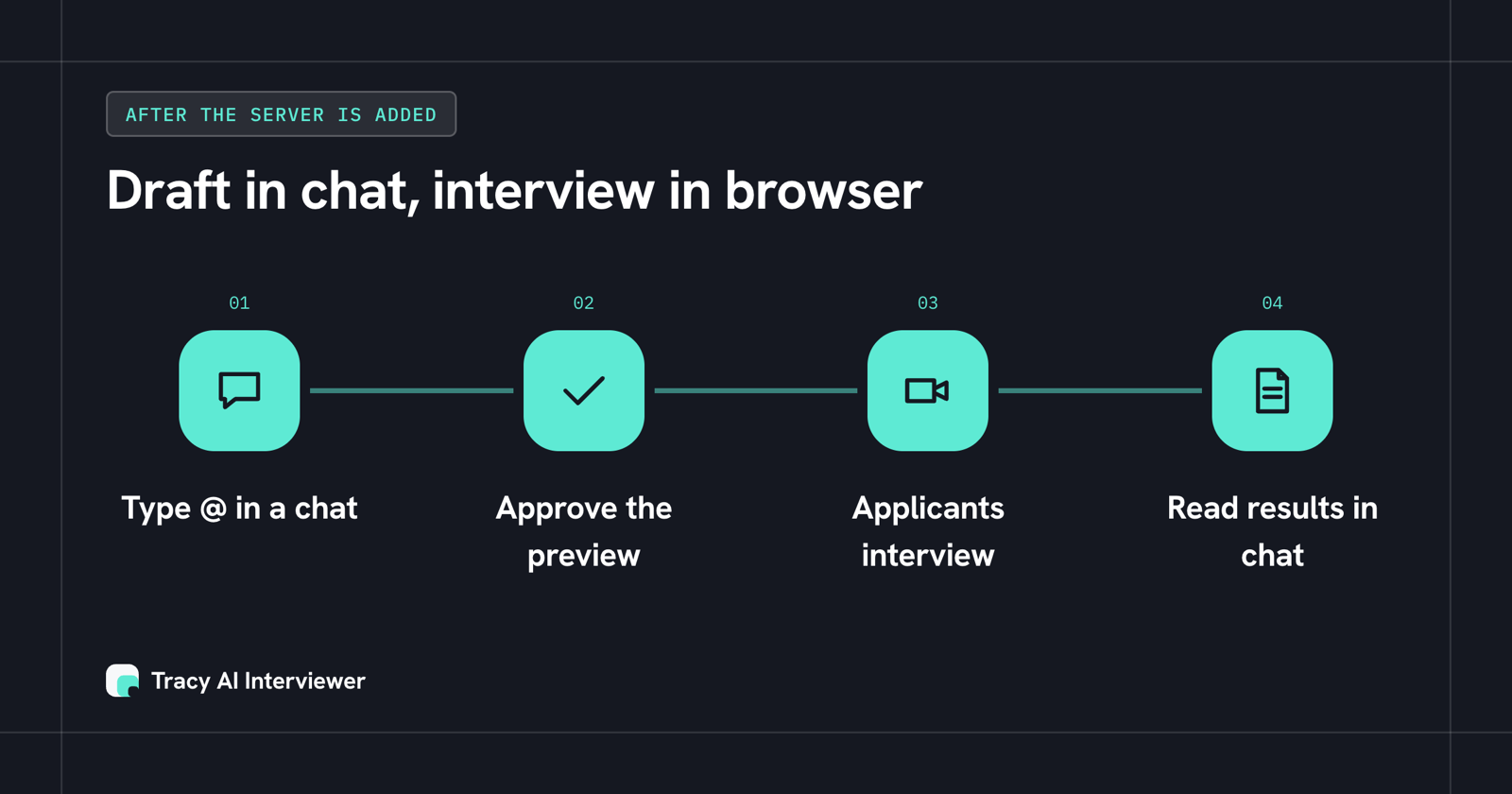
You work in the chat; each applicant interviews in a browser and the results come back to the chat.
What Tracy adds to ChatGPT
- Reach every applicant. Each applicant starts on click, at any hour, with no scheduling and no recruiter on the call.
- Ask the next question. Tracy follows the answer in the applicant's own field and waits for it.
- Keep the evidence. Every result has a recording, a timestamped transcript and a written assessment per question with its reasoning.
MCP access is part of Pay as you go, at $1 per credit with the first 3 results free.
Manage tools, permissions and workspace controls
- Tools. Each plugin has a details page where you can turn individual tools on or off. Select Refresh to pull in new tools and descriptions after the server changes.
- Write actions. OpenAI says write actions by default require confirmation. ChatGPT respects a tool's readOnlyHint annotation, and a tool without it is treated as a write action. Review the tool input before you approve.
- Workspace controls. Lockdown and workspace permissions apply to custom MCP servers. In Tracy's case, one permission, named tracy, is requested and the server acts only on your own account. You can revoke it at any time under Connected AI apps in your Tracy account.
If it doesn't work
- You cannot add the server. A workspace policy may block custom MCP servers. Ask your admin to allow them.
- The sign-in did not open or did not finish. Start a new chat, select the plugin and sign in again. If that fails, add it again with OAuth.
- The chat does not use the plugin. Start a new chat, select the plugin with @ and send the prompt again.
- The tools look out of date. Open the connection on the Plugins page and select Refresh.
- ChatGPT cannot reach the server. Check the public endpoint with the MCP Inspector, which OpenAI recommends for this.
- You revoked access. For Tracy it takes effect at once. Reconnecting means signing in and approving again.
Check that it worked
Two quick checks confirm the connection, and the Connect page lists the other routes if you use more than one AI app. First, open your Tracy AI Interviewer account and look under Connected AI apps: ChatGPT should be listed once the sign-in has finished. Second, start a new chat, type @, choose Tracy AI Interviewer and send your first prompt. A working connection answers with a draft: the title, the questions and the result fields.
If you see a draft, the server is connected and the tools are on. Read it, ask for changes and approve it only when it is right. If you see nothing, go to the list below before you add the server again.
Install Tracy from the Plugins page instead
A custom server is the route for any MCP server. Tracy's own ChatGPT guide recommends a shorter one for Tracy: open Tracy AI Interviewer from the ChatGPT Plugins page, or search for it, click Install plugin, finish the Tracy sign-in and approve access. Then type @, choose Tracy AI Interviewer and send a starter prompt.
Use the custom route for a server of your own. Either way ChatGPT asks for one permission, named tracy, and Tracy acts only on your own account.
Common questions
How do I add a custom MCP server to ChatGPT?
Do I need ChatGPT Developer mode to add an MCP server?
What kind of MCP server works with ChatGPT?
Can ChatGPT take actions through a custom MCP server?
Which ChatGPT plans can add a custom MCP server?
Add Tracy to ChatGPT
Add the connector, ask ChatGPT for a practice interview and approve the preview. The first 3 results are free.
Try it free (opens in a new tab) Book a demo (opens in a new tab)
Your first 3 results are free. No card needed.
Sources
- OpenAI docs: Connect and test your plugin in ChatGPT, retrieved 14 Nov 2026.
- OpenAI docs: Connect your MCP server to ChatGPT, retrieved 14 Nov 2026.
- Tracy AI Interviewer: Add Tracy to ChatGPT, retrieved 14 Nov 2026.
- Tracy AI Interviewer: Pricing, retrieved 14 Nov 2026.
- OpenAI Help: Connecting custom MCP servers in ChatGPT, retrieved 14 Nov 2026.
- ChatGPT pricing, retrieved 15 Nov 2026.