In short
MCP apps are an official extension to MCP that lets a tool return a live interface, such as a chart, form or dashboard, inside the chat. Claude calls them interactive connectors, and ChatGPT supports them too. Tracy AI Interviewer is a standard MCP server: ask for an interview in either chat, read a draft preview and approve it before anything is created. Tracy interviews the people, and your team decides.
MCP apps let an MCP server show something in the conversation that text cannot: a chart you can adjust, a form to fill in, a task board. Without the extension, an MCP tool returns text and data and the chat describes the result. With it, the tool points to a small interface, and the chat shows that interface where you are already working. How MCP servers work covers the base, and Tracy AI Interviewer is the plain-text case, shown below and in its ChatGPT guide.
The chat is where you set an interview up and read it back. The applicant never opens the chat: they open a browser link and talk to Tracy.
What are MCP apps?
MCP Apps is an extension to the core Model Context Protocol. It lets MCP servers deliver interactive interfaces, such as charts, forms and dashboards, that render inline in a chat client. That is what it does well: the adjustable chart or the form sits where you already work, and you do not copy anything out. Version 2026-01-26 of the specification is marked Stable, and a draft version is in development.
An app still arrives through an MCP tool, and a server can expose tools with no interface at all. What an MCP server is covers the base standard.
How an MCP app works
The mechanism has four steps.
- The tool's definition declares a
ui://resource that holds its HTML interface. - The model calls the tool on the server.
- The host fetches that resource and shows it in a sandboxed iframe.
- The interface and the host talk both ways: the host passes the tool's data in, and the interface can ask the host to call other tools.
In Claude, actions taken inside an interactive connector use the permissions you granted to that connector.
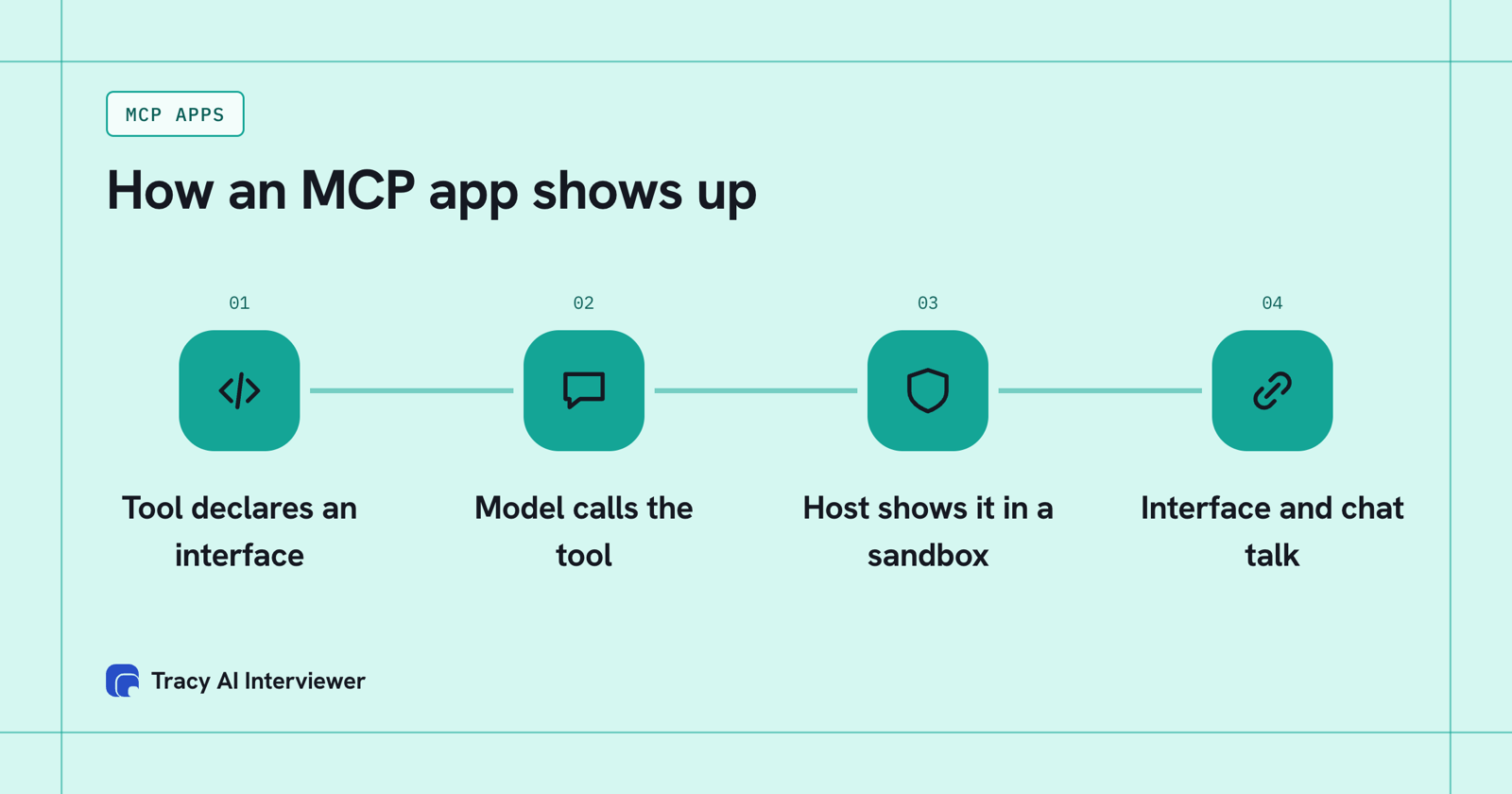
A tool declares an interface, the host shows it in a sandbox, and the two talk.
What do MCP apps look like in Claude?
Anthropic launched interactive connectors, built on MCP Apps, on 26 January 2026. At launch the named connectors were Amplitude, Asana, Box, Canva, Clay, Figma, Hex, monday.com and Slack. Examples from that announcement:
- Asana turns a chat into projects, tasks and timelines.
- Canva creates a presentation outline and lets you adjust branding and design in real time.
- Hex answers data questions with interactive charts, tables and citations.
- Slack retrieves conversations for context and lets you review a drafted message before posting.
Anthropic's help pages describe interactive connectors as opening live apps, such as dashboards, task boards or design tools, in the chat. The announcement lists availability on mobile, web and desktop for Free, Pro, Max, Ultra, Team and Enterprise, and Claude's docs list MCP Apps among the remote connectors on claude.ai. For a shortlist of connectors for a team, see best Claude connectors for business.
How does ChatGPT use MCP apps?
OpenAI's help pages use the same split. A server can expose tools without a custom interface, and MCP apps add an interactive interface to those tools. Some apps provide interactive experiences such as maps or cards, and some plugins include interactive apps you open in full screen from the ChatGPT sidebar.
Two limits are stated on those pages. Custom MCP server connections and full MCP support are listed for ChatGPT Business and Enterprise/Edu on the web, and apps with an interactive interface are not currently supported in company knowledge. OpenAI's developer pages describe plugins as skills, MCP servers and optional UI, so the interface is the optional part.
MCP app, MCP server or plain tool?
The three differ in what the chat shows.
A plain MCP tool, an MCP app and an MCP server compared by what each is, what the chat shows and an example.
| Plain MCP tool | MCP app | MCP server | |
|---|---|---|---|
| What it is | One action the model can call | A tool plus an interface | The program that holds the tools |
| What the chat shows | Text and data | A live interface in the conversation | Nothing by itself |
| Example | Search a file store | An adjustable chart | Tracy at tracyinterview.ai/mcp |
Scroll the table sideways to see all 4 columns.
So a server can hold plain tools, apps or both. Claude's wording for the connection is connector.
Tracy's interview draft in Claude and ChatGPT
Tracy AI Interviewer is an MCP server at tracyinterview.ai/mcp that works in Claude, ChatGPT, Mistral, Gemini and Copilot Studio. Ask for an interview in plain language and the chat comes back with a draft before anything exists.
In ChatGPT the draft appears as a preview: the opening line, each question with the report field it fills, and a closing line. In the screenshot below that preview is text and a table in the chat. Approve it and ChatGPT creates the interview with nobody invited yet. A new interview starts with its public link on (anyone with the link, up to 20 people for 14 days), and the host can turn it off. An invitation is previewed too and is not sent until you approve it.
In Claude the same request shows an approval prompt first, Claude wants to use Suggest an interview from Tracy AI Interviewer, with Deny, Always allow and Allow once. Tracy's Claude guide and ChatGPT guide show each step.
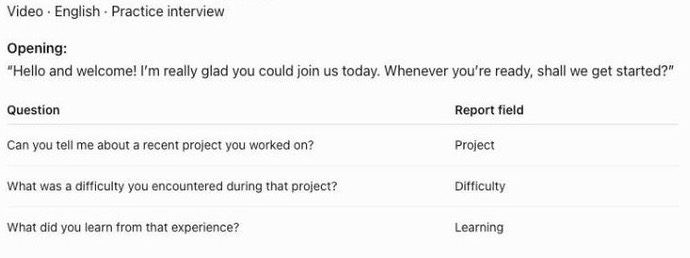
ChatGPT shows Tracy's draft as a preview you read before anything is created.
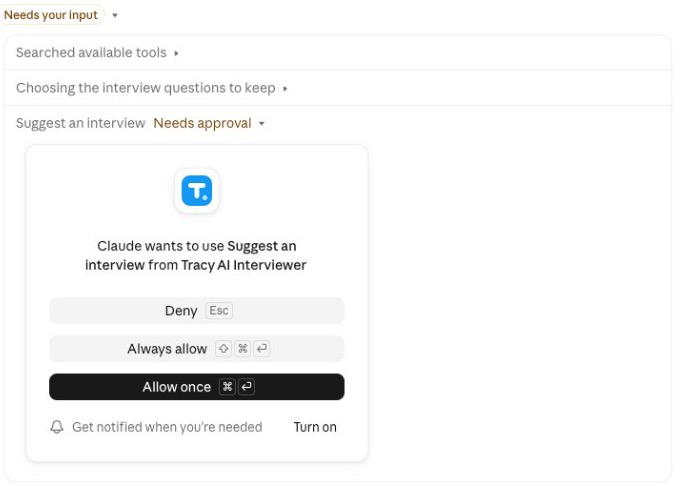
Claude asks for your approval before it drafts an interview with Tracy.
What Tracy adds to a chat with MCP
01
Reach every applicant
Each applicant can start on click, at any hour, with no scheduling and no recruiter on the call. Applicants open an interview link in a browser and need no Claude or Tracy account.
02
Ask the next question
Tracy interviews each person on video, asks in their own field, follows what they said and waits for the answer.
03
Keep the evidence
Every result has a recording, a timestamped transcript and a written assessment per question with its reasoning. Reading results in the chat returns what the participant said to each question, the result fields and a note for an applicant tracking system. Tracy does not score, rank or reject anyone.
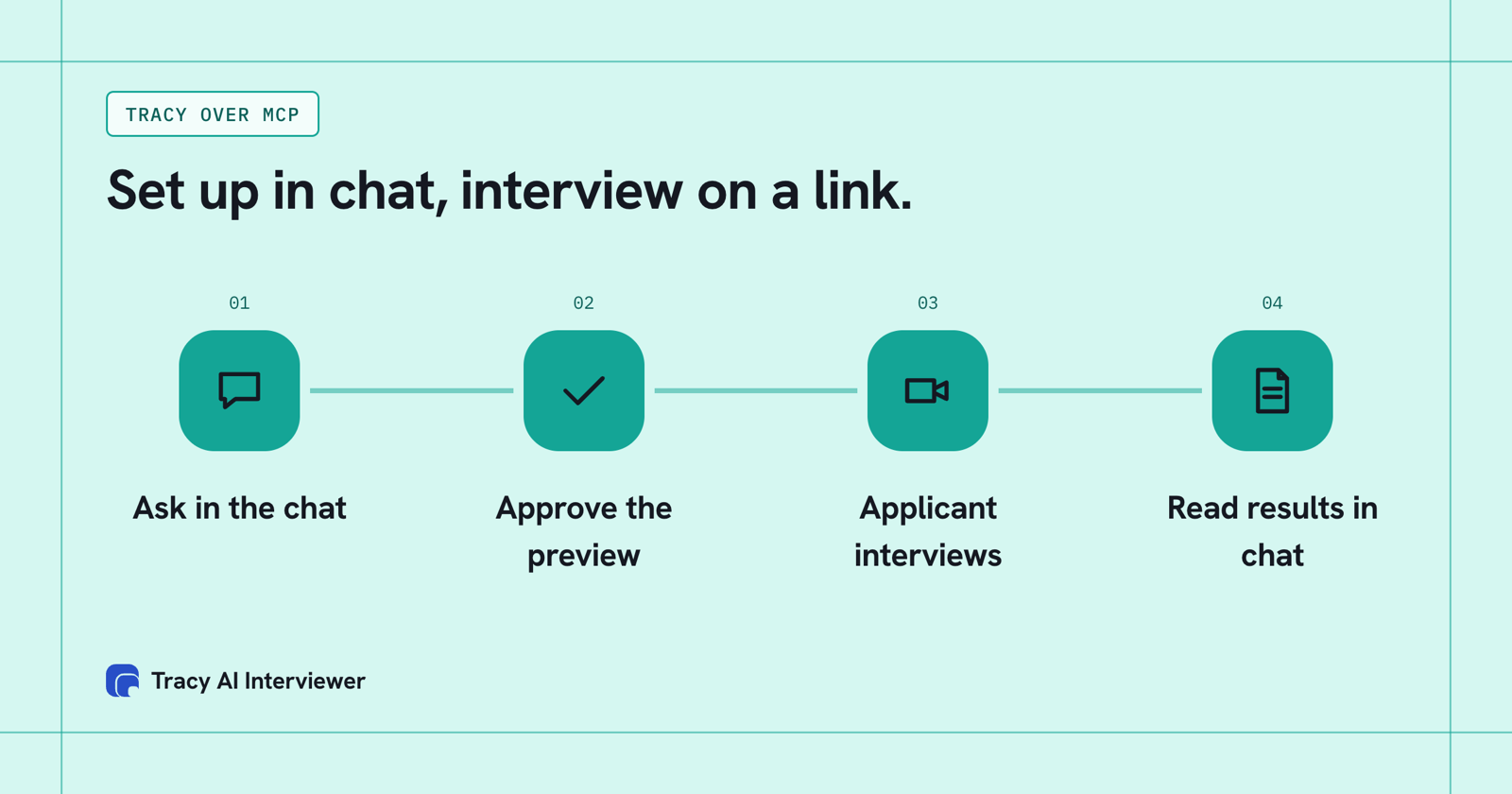
The owner works in the chat; the applicant interviews on a link.
Where the chat ends and the interview begins
The connection splits one hiring task across two places. The owner stays in Claude or ChatGPT: they ask for a draft, approve the preview, approve the invitations and ask for results. Tracy's interview happens elsewhere, on a link the applicant opens in a browser.
A new interview starts with its public link on, for up to 20 people over 14 days, and nobody invited yet. Invitations go only to the addresses you provide, and each one is previewed before it is sent. The host can turn the link off.
The consequence for the owner: nothing is created, invited or enabled without a click, and the people being interviewed never need to enter the chat.
Common questions
What are MCP apps?
Are MCP apps the same as ChatGPT apps?
Which clients support MCP apps?
Are MCP apps safe?
Do I need an MCP app to use Tracy in Claude or ChatGPT?
Do MCP apps work on mobile?
See the draft preview in your own chat
Connect Tracy to Claude or ChatGPT and ask for one interview. You read the preview before anything is created. The first 3 results are free.
Try it free (opens in a new tab) Book a demo (opens in a new tab)
Your first 3 results are free. No card needed.
Sources
- MCP Apps documentation, retrieved 14 Nov 2026.
- Anthropic, Your favorite work tools are now interactive connectors inside Claude (26 Jan 2026), retrieved 14 Nov 2026.
- Anthropic, Get started with connectors, retrieved 14 Nov 2026.
- OpenAI Help Center, Connecting custom MCP servers in ChatGPT, retrieved 14 Nov 2026.
- OpenAI Help Center, Connected apps in ChatGPT, retrieved 14 Nov 2026.
- Tracy AI Interviewer, ChatGPT guide, retrieved 9 Nov 2026.
- Tracy AI Interviewer, Claude guide, retrieved 9 Nov 2026.
- Tracy AI Interviewer, Connect, retrieved 10 Nov 2026.