In short
Copilot for HR means Microsoft Copilot doing HR work: drafting job descriptions, interview questions and offer templates, summarising Teams meetings and analysing spreadsheets.
Your licence decides what it can see. Copilot Chat (Basic) works from the web and what you paste in. The Premium add-on reaches your Microsoft 365 data.
Tracy AI Interviewer connects to a Copilot Studio agent, so a person can start a video interview from a chat and read what each candidate said.
The first 3 Tracy results are free.
What is Copilot for HR?
Copilot for HR is Microsoft Copilot used for people work: drafting job descriptions, interview questions and offer letters in Word, summarising meetings in Teams, analysing survey results in Excel and answering policy questions through an agent. Microsoft's Copilot Scenario Library groups HR examples under recruiting, onboarding and similar jobs. What Copilot can see when you ask depends on your licence.
If you are choosing between assistants, ChatGPT vs Copilot for HR and Gemini for HR cover the others.
How can HR use Microsoft Copilot?
Microsoft's overview page lists what Copilot does in each app, and these are the ones an HR team reaches for.
| Job | Where | What Microsoft says it does |
|---|---|---|
| Job description | Copilot Chat in Word | Microsoft's recruiting scenario prompt asks for a job description for an Accounting Director |
| Interview questions | Copilot Chat in Word | The same scenario asks for 5 questions for an Executive Assistant |
| Offer letter | Copilot Chat in Word | The scenario asks for a customisable offer letter template |
| Meeting recap | Teams | Summarises up to 30 days, transcribes and captures action items |
| Survey questions | Forms | Drafts questions for surveys and polls |
| Survey results | Excel | Analyses data, generates insights and creates formulas |
The scenario page says its content is for demonstration only and tells readers to review how Copilot fits their business processes and regulatory requirements. Treat every output as a first draft that a person edits.
Which Copilot sees your HR data?
Microsoft describes three experiences that differ by data grounding, integration depth and licensing. Copilot Chat (Basic) comes with eligible Microsoft 365 licences. It mainly uses web data, and you must give it organisational content by pasting text, uploading a file or opening the content in Outlook or Teams. The Microsoft 365 Copilot (Premium) add-on grounds answers in emails, files, meetings and calendars through Microsoft Graph and Work IQ and pulls that information automatically. Microsoft's pricing page, read 23 November 2026, shows the Business add-on at $18 per user per month billed annually under a first-year offer that runs to 31 December 2026, and says Copilot Chat is included at no additional cost with eligible plans.
Access follows user permissions, so a salary spreadsheet shared too widely is a file Copilot can use for anyone who can open it. Microsoft lists SharePoint Advanced Management among the Premium features that reduce oversharing. With a Microsoft Entra sign-in, Microsoft also says prompts and responses carry the same contractual terms as Exchange email and SharePoint files and are not used to train foundation models. It adds that the specific controls vary with your plan, so ask your admin what applies.
Copilot prompts for HR you can copy
These two work in Copilot Chat once you paste in the material they refer to.
Here is our leveling guide for the role: [paste]. Write a job description for a Customer Support Lead. Keep to the responsibilities and skills in the guide, list five must-haves and three that can be learned on the job, and flag anything in the guide that is unclear.
Here is our leave policy: [paste]. Rewrite it for a new hire in plain words, then list the three questions a new hire is most likely to ask that the policy does not answer.
The second prompt returns a gap list that shows where the policy needs work.
Copilot for HR professionals: training from Microsoft
Microsoft points users to different material by licence. For Copilot Chat (Basic) it lists a getting-started guide and a short video tutorial. For Microsoft 365 Copilot (Basic) it names the Learn path "Transform ideas into action with Copilot", which covers prompts and the AI-powered features. For Premium it lists the Copilot Prompt Gallery, the Copilot Success Kit, a downloadable Trainer Kit and user tools and templates. Ask your admin which you have before you build an HR training session around a feature your team cannot open.
Whatever the licence, add a rule to your own training that keeps payroll, health and disciplinary detail out of a prompt unless your policy allows it.
Where an interview starts
Copilot drafts the questions and summarises a meeting that people hold. The interview itself still needs someone on the call, or a tool that runs it.
Tracy AI Interviewer runs it on video. Each person starts on click, at any hour, with no calendar, and Tracy asks follow-up questions in the person's own field. Microsoft says a Copilot Studio agent can use tools from an MCP server, with generative orchestration turned on, and tells users to connect only to servers they trust. Tracy in Copilot Studio and adding an MCP server in Copilot Studio walk through the setup. Once the server is added, a recruiter or HR partner can ask the agent:
Set up a 30 day check-in for new hires in the support team about what was unclear in their first month. Show me the preview before you create it.
Creating the interview and inviting people wait for approval of a preview. A new interview starts with its public link on (anyone with the link, up to 20 people for 14 days) and nobody invited, so turn the link off if you are inviting by email. When someone finishes, ask the agent for the results: what each person said to each question and the result fields, with a recording and a timestamped transcript in the report. Tracy does not score, rank or reject anyone.
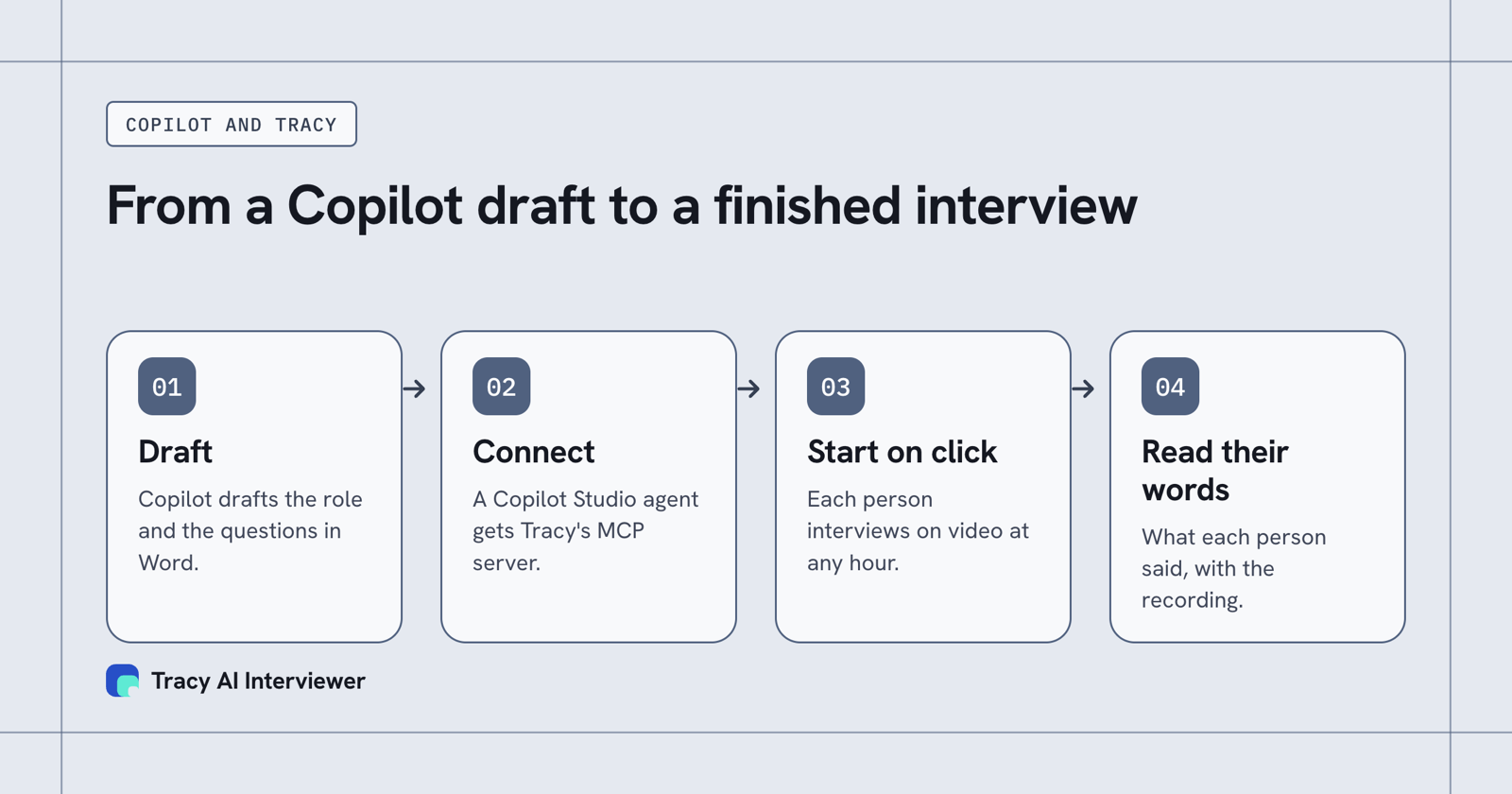
Copilot covers the draft; the interview starts from the same chat once Tracy is connected.
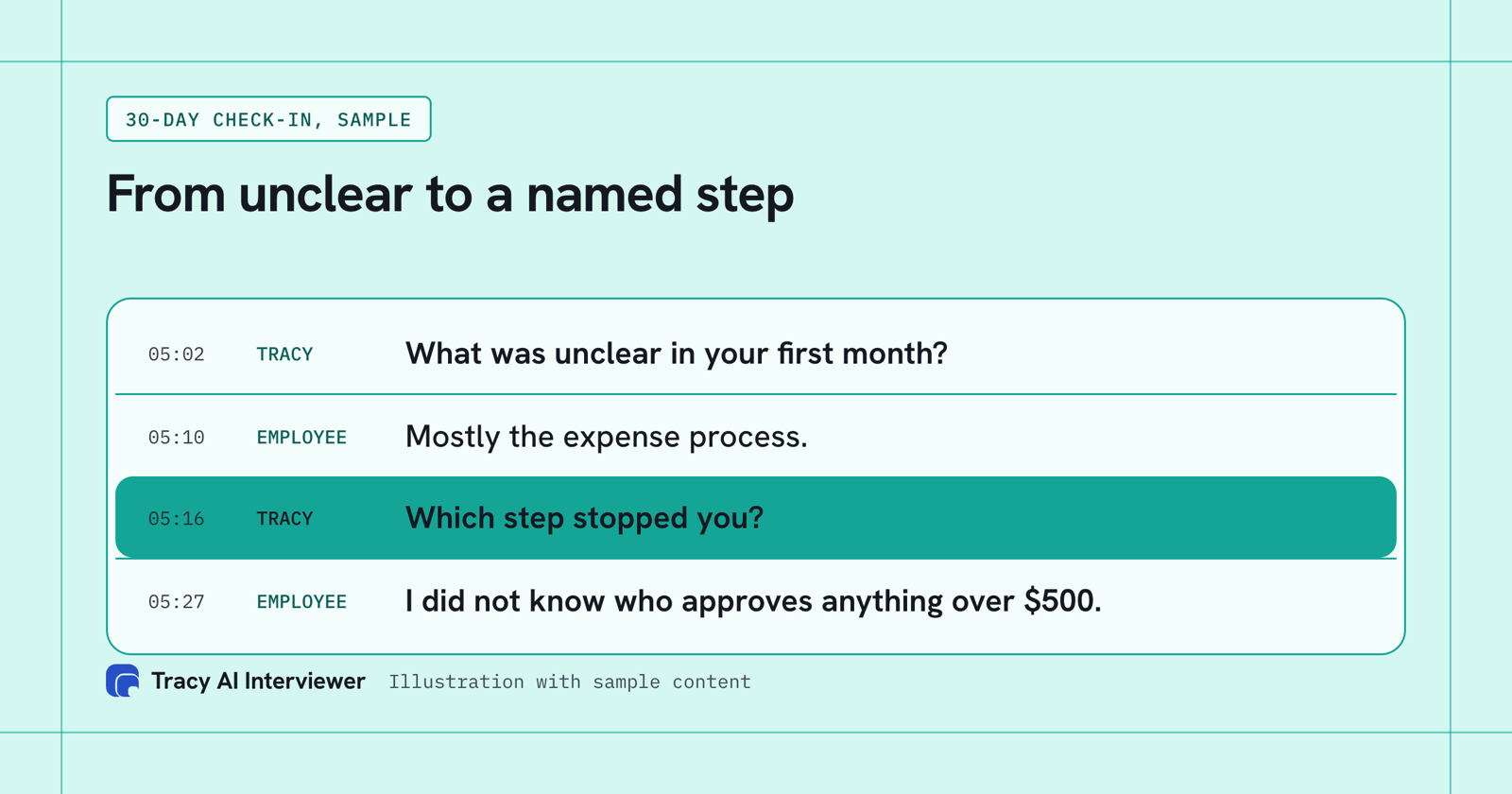
A vague answer gets a sharper question, so the report names the real gap.
Which path fits you?
- You have Copilot Chat only: paste in text that carries no sensitive detail, and use the prompts above.
- You have the Premium add-on: tidy the sharing on your HR sites before you roll it out to the team.
- You need people interviewed, not drafts: start from AI interviews for people teams or the 30-60-90 day check-in questions.
- You are comparing tools across HR: best AI tools for HR lines them up.
Common questions
What is Copilot for HR?
How can HR use Microsoft Copilot?
Does Copilot use our HR data to train its models?
Is there Copilot training for HR professionals?
Can a Copilot agent start an interview with Tracy?
Start an interview from a Copilot agent
Add Tracy to a Copilot Studio agent, ask for an interview and approve the preview. The first 3 results are free.
Try it free (opens in a new tab) Book a demo (opens in a new tab)
Your first 3 results are free. No card needed.
Sources
- Microsoft Learn: What is Microsoft Copilot? (ms.date 17 Nov 2026), retrieved 23 Nov 2026.
- Microsoft Copilot Scenario Library: HR, streamline your recruiting process, retrieved 23 Nov 2026.
- Microsoft 365 Copilot pricing (US), retrieved 23 Nov 2026.
- Microsoft Learn: Enterprise data protection for Copilot, retrieved 23 Nov 2026.
- Microsoft Learn: Extend your agent with MCP, retrieved 23 Nov 2026.
- Add Tracy AI Interviewer to Copilot Studio (public guide), retrieved 23 Nov 2026.