In short
Claude for market research handles the desk work well: Research, web search with citations, Projects and your uploaded files. It reads what already exists. Tracy AI Interviewer connects to Claude, so you draft a customer interview in the chat, approve it, and Tracy runs it on video with follow-ups. Each result links to the customer's words and the recording, and a person decides what it means.
What Claude for market research does well
It reads, searches and structures. Anthropic's own help pages describe four features that matter here, as of 14 November 2026:
- Research. Claude runs multiple searches that build on each other and decides what to look into next. It is on paid plans (Pro, Max, Ultra, Team, Enterprise), searches the web and the connectors you have turned on for the chat, and needs web search switched on. Anthropic notes that research sessions can use up your limits faster.
- Web search. Real-time data with citations in every response, so you can open each source.
- Projects. Self-contained workspaces with their own chat histories, a knowledge base and project instructions. Free accounts get up to five.
- File uploads. PDF, DOCX and CSV among the supported types, up to 20 files per chat, 500 MB per file as of 14 November, so check the limit before a big upload.
Open the source behind any figure you plan to repeat. If you work in ChatGPT instead, the ChatGPT version covers the same ground with that tool's features.
How do you set up a Claude Project for a research round?
Make one Project per study. Put the decision, the segment and what would change your mind in the project instructions, and drop in what you already have: last quarter's survey export, win-loss notes, the competitor pricing pages you saved. Every new chat in the Project starts from that shared context, so you stop re-explaining the brief.
A starting instruction: "You are helping me answer one decision: [decision]. Before any claim, say which uploaded file or cited source it comes from. Where nothing supports a claim, write 'not stated'. Ask me one clarifying question before you start a long task."
Which Claude prompts work for market research?
- Frame the decision. "List the three questions whose answers would change [decision], and the evidence that would answer each. Mark which need a customer, not a document." The last sentence sorts your round into desk work and interview work before you start.
- Run the scan with Research. "Using Research, compare how [three vendors] describe their target customer and pricing on their own pages. Give each claim a link."
- Read your files. "From these win-loss notes, list the reasons deals were lost, grouped by theme, with one verbatim line per theme."
- Find the gaps. "Which of my questions could these sources not answer? Turn each into a question for a customer interview." This is the hand-off prompt: its output is your interview guide.
- Stress-test the story. "Argue the opposite of this conclusion using only the sources above."
A skill can package the method once you trust it. Anthropic's Skills give Claude specialised knowledge and workflows, are available on every plan and need code execution turned on. They are worth the effort only for a routine you run every quarter.
Why your last prospects chose someone else
A market scan from Claude arrives with sources and a confident summary, but it cannot tell you why your last three prospects chose someone else. Claude can read what three vendors say about themselves. Only a prospect can say what tipped the decision, and the interview is where you ask.
Prompt 4 above turns your gaps into interview questions. Here is what one of them looks like once a customer answers.
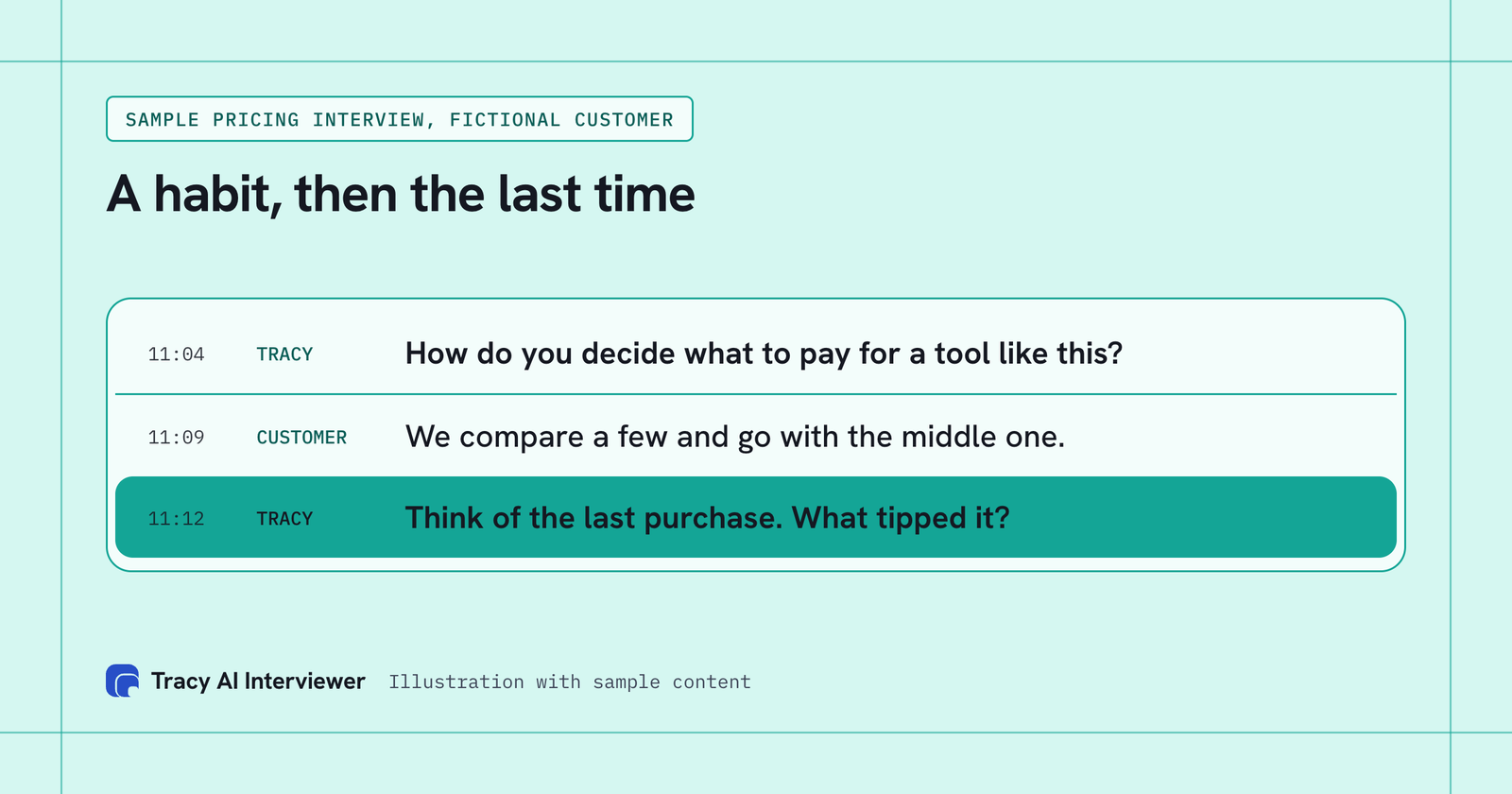
A habit a customer states becomes a decision once Tracy asks about the last purchase.
"We compare a few and go with the middle one" is a habit. A reason you can act on sounds like "the last time, the middle one had the integration we needed" (an invented sample answer). Tracy asks for the reason in every interview. The cost is time: ten 20-minute interviews are about 3 hours of live calls, spread across ten calendars. Through Tracy, customers start from one link at any hour, and you read the results.
What Tracy adds to Claude for market research
- Reach every customer you invite. Each person starts on click, at any hour, with no scheduling and no researcher on the call. Your sample stops depending on calendars.
- Ask the next question. Tracy follows the answer in the customer's own field and waits for it, so "we compare a few" becomes the last purchase.
- Keep the evidence. Each result has a recording, a timestamped transcript and a written assessment per question with its reasoning, so you can quote a customer and open the moment.
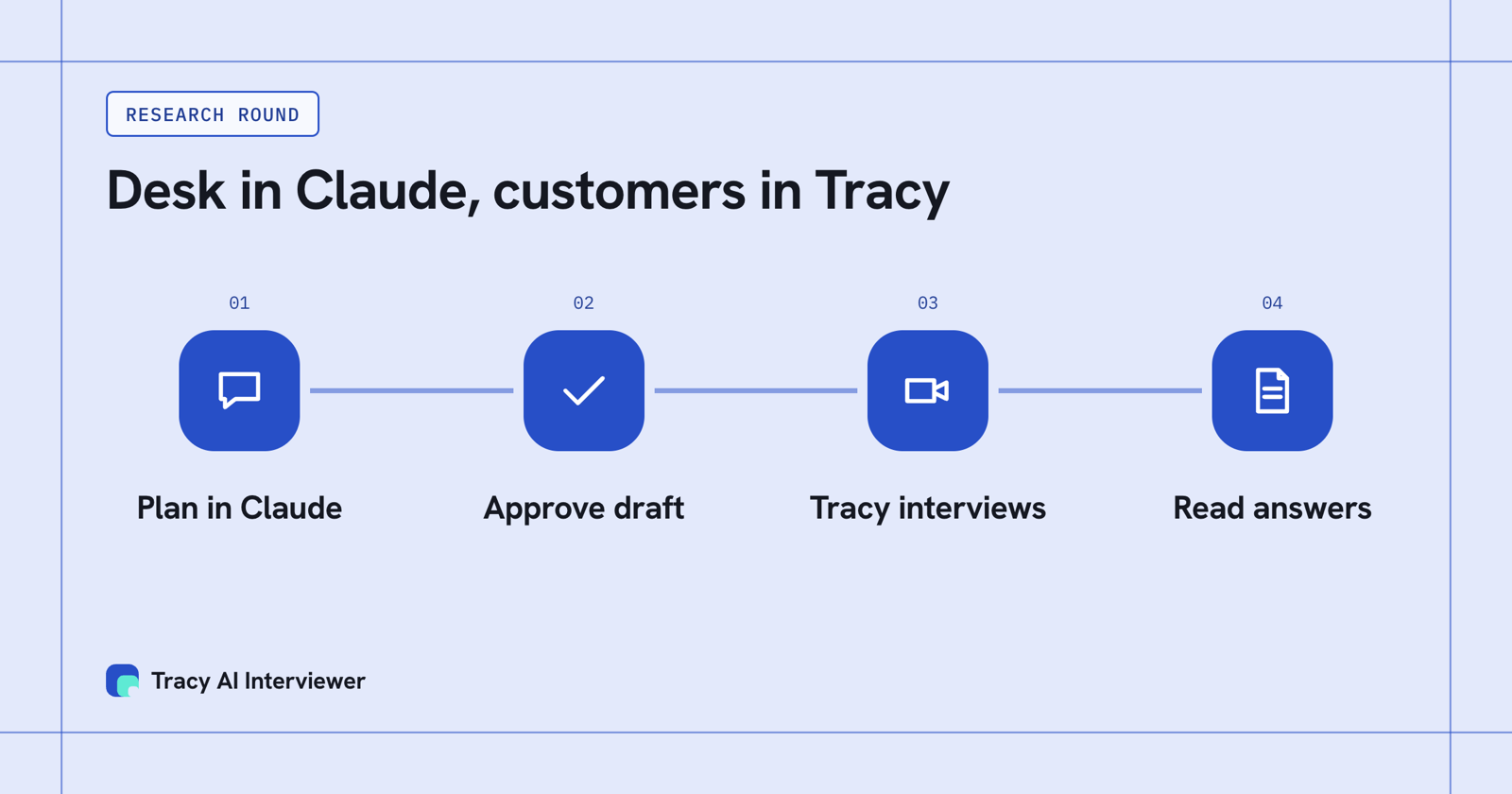
Claude reads the desk and drafts the guide, you approve it, and Tracy interviews your customers.
How do you run customer interviews from Claude?
Add Tracy AI Interviewer to Claude as a custom connector at tracyinterview.ai/mcp. Custom connectors work on Free (one connector), Pro, Max, Ultra, Team and Enterprise, and on Team an owner adds it first. The five steps are in Tracy in Claude. Tracy is a remote MCP server, the kind Claude on the web connects to; Claude Desktop and Claude Code can also run local servers, which Tracy does not need. How an MCP connection works covers the term.
Then ask in plain language, using the guide questions that prompt 4 produced: "Use Tracy AI Interviewer to set up a 15-minute customer interview for [segment] about the last time they [did the job]. Use these questions: [paste]. Show me the draft."
Claude asks for approval before each use of a Tracy tool, with Deny, Always allow and Allow once. Anthropic advises clicking Always allow only for servers and tools you trust, so use Allow once until you have watched it work. The draft comes back for you to read, and nothing is created until you approve it.
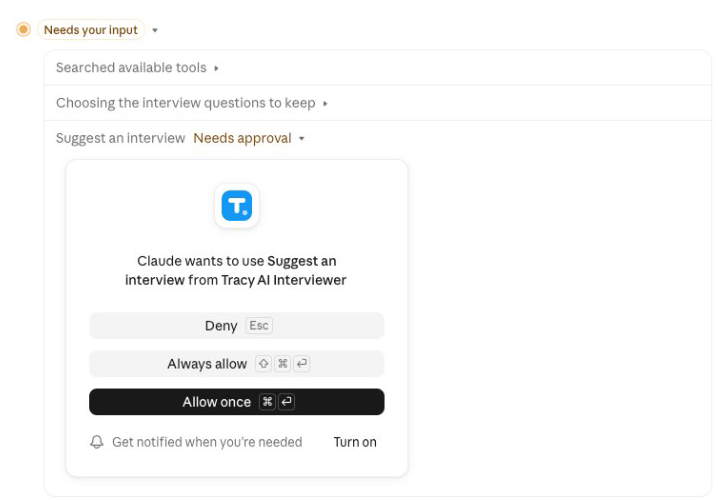
Claude asks for your approval before it drafts an interview with Tracy.
What happens after you approve?
Invite customers by email from the list you hold, or share the public link. A new interview starts with the link on (anyone with the link can join, up to 20 people for 14 days) and nobody invited, and you can switch it off in the chat. Each customer joins in a browser, at any hour, with no account, and is told on the join screen that the conversation is recorded and transcribed.
Tracy then runs the interview. She listens, waits for the end of the thought and asks for the missing detail. Every customer gets the same guide, so the answers compare across the round. Back in Claude, ask "who has finished?" and the results come into the chat: what each customer said to each question and the result fields. In Tracy you also get the recording of both sides and a timestamped transcript. Each result links to the words and the moment, which makes it quotable. Reading across interviews covers how to compare them. Grouping answers into themes is done by Claude or by you.
What stays with you?
- Who to ask. Tracy invites the people you supply; it does not look up or collect addresses.
- What to ask. Your questions, or a draft you edit. Start from a set of discovery questions if you need one.
- What it means. Tracy reports what each customer said. She does not score or rank them, and you decide what the round says.
- The size of the round. A reasonable start: one segment, a first batch you read in full, then more only if new reasons keep turning up.
Pay as you go is $1 per credit, one credit per started 20 minutes, and the first 3 results are free, so a first batch of ten 20-minute interviews is $10 before you commit to a bigger round. The pricing page has the current plan, and the customer research use case shows the flow end to end.
Which path fits you?
- Using ChatGPT instead: ChatGPT for market research.
- Installing Tracy in Claude: the step-by-step guide.
- Running one study from a chat: Claude user interviews.
- Checking cost first: the pricing page.
Common questions
How does Claude help with market research?
Can Claude do market research on its own?
What is the Claude agent for market research?
Can Claude interview customers?
Does Tracy find the customers to interview?
Run one customer interview from Claude
Add the Tracy connector, approve one draft and send customers a link. You read what they said. The first 3 results are free.
Try it free (opens in a new tab) Book a demo (opens in a new tab)
Your first 3 results are free. No card needed.
Sources
- Anthropic: Using Research on Claude, retrieved 14 Nov 2026.
- Anthropic: Enabling and using web search, retrieved 14 Nov 2026.
- Anthropic: What are projects?, retrieved 14 Nov 2026.
- Anthropic: What kinds of documents can I upload to Claude?, retrieved 14 Nov 2026.
- Anthropic: Using Skills in Claude, retrieved 14 Nov 2026.
- Anthropic: Custom connectors using remote MCP, retrieved 14 Nov 2026.
- Tracy AI Interviewer: Claude guide, retrieved 14 Nov 2026.
- Tracy AI Interviewer: Pricing, retrieved 11 Nov 2026.