In short
What is time to fill? The calendar days from requisition opened to offer accepted, a clock that only helps once you time each stage. Tracy takes scheduling out of the screening stage: applicants start on click, at any hour, and a recruiter gets what each person said to each question. Approvals, posting and the offer stay with your team, and your team decides who is hired.
What is time to fill?
Time to fill is the number of calendar days from the day a job requisition opens to the day the candidate accepts the offer. SHRM defines it that way and counts weekends and holidays. Its strength is that it counts the whole wait, from the first approval to a signed yes, which is why it starts earlier than time to hire.
The formula is one subtraction: the date the offer was accepted minus the date the requisition opened. The clock tells you a role was slow. It takes a stage-by-stage look to find out why.
Time to fill counts the days a role stays open, from requisition to accepted offer.
How do you calculate time to fill?
Subtract the date the requisition opened from the date the offer was accepted, in calendar days. For several roles, add the days for every role filled in the period and divide by the number of roles. SHRM reports medians, which one slow role cannot skew as much as a mean.
Three roles filled in one quarter, with the mean and the median (fictional example).
| Role | Requisition opened | Offer accepted | Days to fill |
|---|---|---|---|
| Support specialist | 3 March | 16 April | 44 |
| Data analyst | 10 March | 28 March | 18 |
| Account manager | 17 March | 14 May | 58 |
Scroll the table sideways to see all 4 columns.
The mean is 40 days and the median is 44. Some teams start the clock at requisition approval or at the public posting instead of the opening. Pick one start point, write it down and use it every quarter.
How is time to fill different from time to hire?
Both count calendar days to an accepted offer. They start at different points. Time to fill starts when the requisition opens, so it includes the days a role waits for approval and posting. Time to hire starts when the hired candidate enters the process, so it leaves them out and is usually shorter.
Three hiring clocks, where each starts and ends, and whether it counts waiting for approval.
| Clock | Starts | Ends | Counts approval days |
|---|---|---|---|
| Time to fill | Requisition opened | Offer accepted | Yes |
| Time to hire | Candidate applies or is found | Offer accepted | No |
| Time to offer | Candidate applies or is found | Offer sent | No |
Scroll the table sideways to see all 4 columns.
Definitions of time to hire vary by company, some starting at the application and some at first contact. Choose one and keep it. Our time to hire benchmark page sets out the same difference with the SHRM data.
What is a good time to fill?
The benchmark to cite is SHRM's 2025 benchmarking brief. SHRM fielded the survey to a random sample of its active US members from 9 January to 3 March 2025 and oversampled members at VP level or above. In total 2,371 members responded. The median time to fill was 44 days for nonexecutive roles and 45 days for executive roles. For nonexecutive roles it was also 44 days in 2022 and 30 in 2017. SHRM's extra-large organizations reported a median of 61 days for nonexecutive roles.
Use it as a guide. The data is self-reported by members, not weighted, and not every respondent answered every question. A good time to fill is one you can explain stage by stage for your own roles.
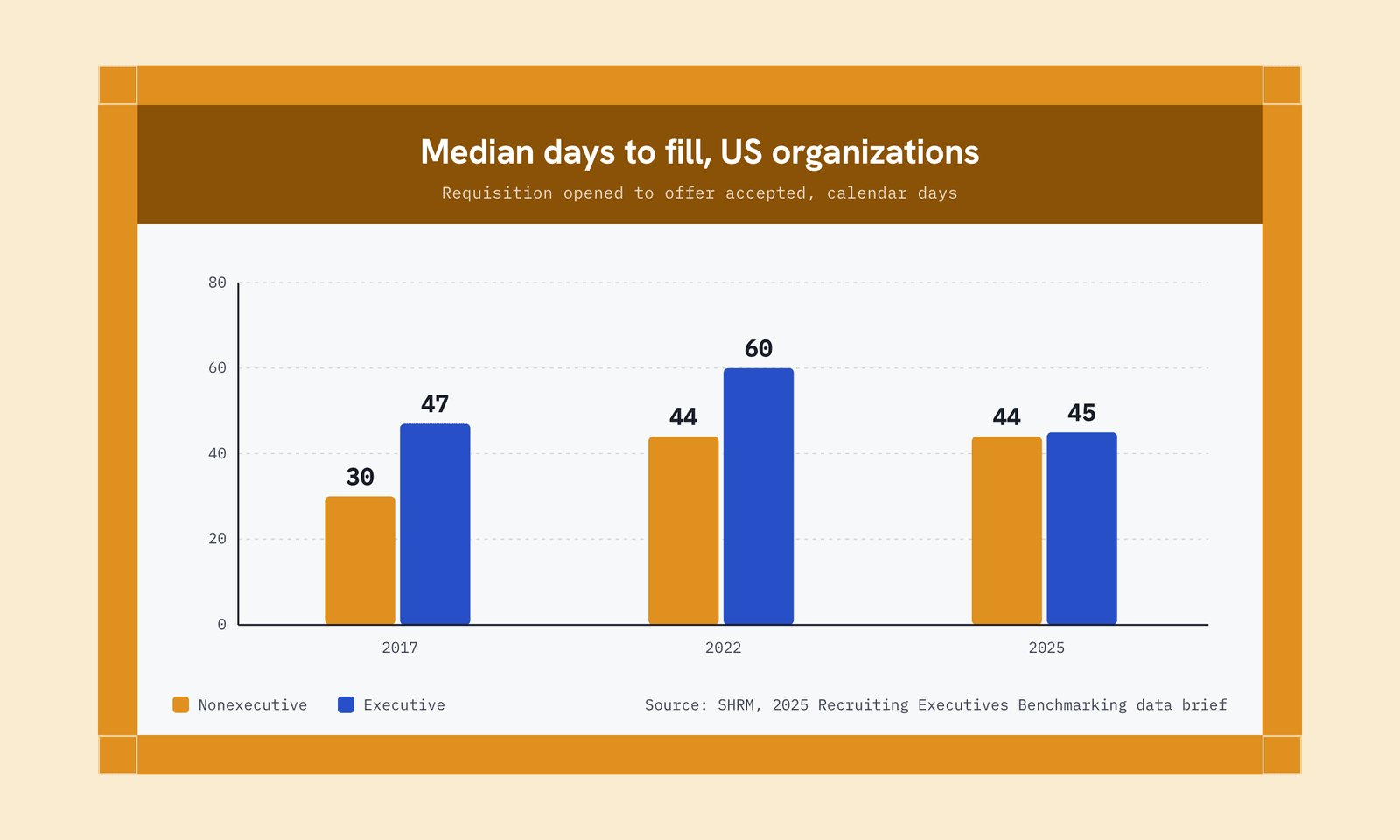
The median nonexecutive role took 44 days to fill in 2025, up from 30 in 2017.
Screening and first interviews are the stages that wait on calendars
SHRM splits time to fill into seven stages: requisition opened to approved, approved to posted, posted to screening started, screening applicants, conducting interviews, the final decision and offer, and offer to acceptance. Two teams with a 44-day median can have different problems, so time the stages for your own roles for a quarter before you set a target.
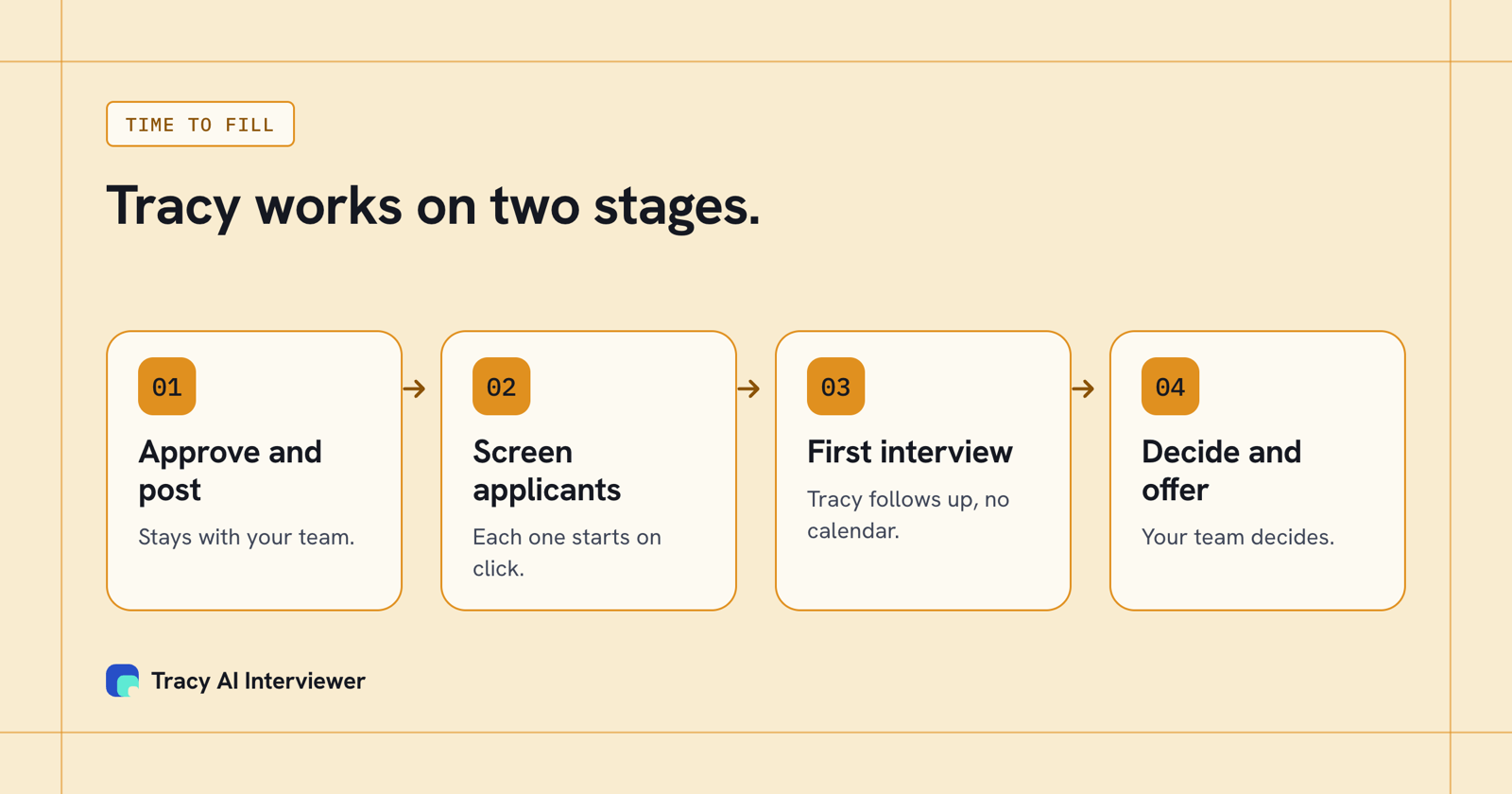
Tracy works on screening and the first interview; approvals, posting and the offer stay with your team.
Say a role draws 100 applicants and each gets a 20-minute screen. That is about 33 hours of live calls, booked one at a time around the recruiter's calendar and the applicant's. The last applicant waits for the slot the first one did not take, and every day of that wait counts toward time to fill. If each applicant starts from a link, nobody waits for a slot, and the stage ends when the last person finishes.
Time this stage first on your next role. If it is long, the screens are where the days are.
How to shorten time to fill
Match each fix to the stage that is slow.
- Approve before you open. If the first stage is long, agree headcount and the job post in advance for roles you hire often.
- Post the same day. A role approved on Monday and posted on Friday has lost four days before it starts.
- Screen as applications arrive. Waiting for a batch adds the days between the first applicant and the last.
- Take scheduling out of screening and first interviews. These stages wait on calendars. See high volume recruitment for how teams handle it.
- Set a decision date. Agree before the interviews how many days the team has to decide.
- Send the offer quickly, and agree who signs it before the last interview.
What Tracy adds to time to fill
Tracy works on the screening and first-interview stages. It does not change approvals, posting or the candidate's decision.
- Reach every applicant. Each applicant starts from the link at any hour, with no scheduling and no recruiter on the call. Nobody waits for a slot, and a reminder can be sent after a day.
- Ask the next question. Tracy follows the answer in the applicant's own field and waits for it, so even the first look at a candidate is an interview.
- Keep the evidence. Every result has a recording, a timestamped transcript and a written assessment per question with its reasoning. A manager can open it without a call, and the recruiter chooses who goes to the manager.
One customer cut its average time to hire from 44 days to 7. For staffing teams, where the clock affects placement, see speed to submit. To measure the effect, run one role and time the screening stage before and after.
Related terms
- Time to hire. Counted from the day the hired candidate enters the process.
- Time to offer. Counted from the same start to the day the offer goes out.
- Time to productivity. Days until a hire works at full speed.
- Cost per hire. The total cost to recruit one hire.
- Quality of hire. The value a hire brings, measured after they start. See what quality of hire is.
- Requisition. The approved request to hire for a role.
Which path fits you:
- Many applicants: see hiring at volume.
- Staffing teams: see AI interview tools for staffing agencies.
- What the screen produces: see what an interview report contains.
Common questions
What is time to fill?
How is time to fill different from time to hire?
How do you calculate time to fill?
What is a good time to fill?
How can AI help shorten time to fill?
Time the screening stage with one role
Send one role's applicants a Tracy link and time the screening stage. The first 3 results are free.
Try it free (opens in a new tab) Book a demo (opens in a new tab)
Your first 3 results are free. No card needed.
Sources
- SHRM (2025), 2025 Recruiting Executives Benchmarking: Insights to Maximize Recruitment, data brief, retrieved 9 Nov 2026.
- Tracy AI Interviewer home page, retrieved 14 Nov 2026.
- Tracy AI Interviewer pricing, retrieved 14 Nov 2026.