In short
Gemini can use an MCP server in four places: the Gemini app, Gemini Enterprise, the command line (Gemini CLI and its replacement Antigravity CLI) and the Gemini API. Each has its own steps and limits.
In the Gemini API and in Antigravity a remote server has to speak Streamable HTTP; SSE servers are not supported there.
Tracy AI Interviewer is a remote MCP server at tracyinterview.ai/mcp. Added to Gemini, it starts and reads video interviews from a chat, and creating or inviting waits for your approval of a preview. The first 3 results are free.
Gemini MCP means Gemini calling tools on a Model Context Protocol server. MCP is an open-source standard for connecting AI applications to external systems, and a remote MCP server publishes tools that an assistant can use on your behalf. The steps depend on whether you work in the Gemini app, in Gemini Enterprise, in a terminal or in code, and the next section sorts those out.
How do you use MCP with Gemini?
Pick the row for where you work. Each cell comes from Google's current documentation or from Tracy's own Gemini guides.
| Where | How you add a server | Watch for |
|---|---|---|
| Gemini app | Settings, Connected Apps, then Custom | Personal Google Account, 18 or over, in the US, Keep Activity on, Gemini in English |
| Gemini Enterprise | An administrator adds it | Streamable HTTP only; the Business edition is Pre-GA |
| Gemini CLI | gemini mcp add | Google's docs say Gemini CLI was replaced by Antigravity CLI on 18 June 2026 for the unpaid tier and Google One users |
| Antigravity | serverUrl in mcp_config.json, or /mcp | Streamable HTTP only; httpUrl is not supported |
| Gemini API | A tools entry of type mcp_server | Streamable HTTP only; names in snake_case |
Tracy's guide says Google's custom MCP documentation names only the Gemini app and Gemini Enterprise as chat places.
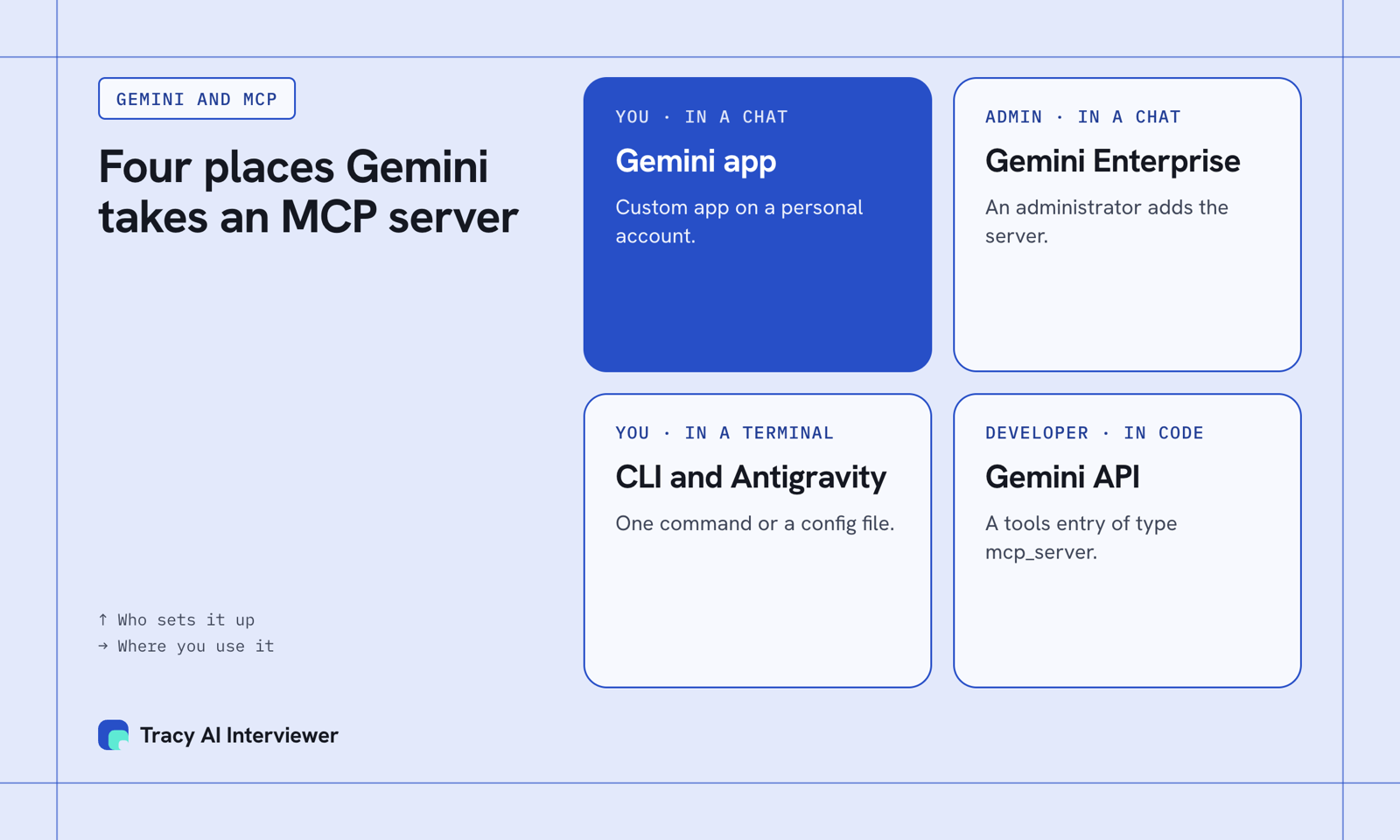
Where you set up the server depends on who you are and where you work.
Gemini CLI MCP setup
Gemini CLI saves each server in a settings.json file. The command is gemini mcp add [options] <name> <commandOrUrl> [args...], and it defaults to the project scope and the stdio transport. For a remote server on Streamable HTTP, add --transport http:
gemini mcp add --transport http my-server https://example.com/mcp
In the file, command runs a local process, url points at an SSE endpoint and httpUrl points at a Streamable HTTP endpoint. The --scope user option writes to ~/.gemini/settings.json so the server is there in every project, while the default writes .gemini/settings.json in the current one.
For a server that needs sign-in, Gemini CLI supports OAuth 2.0 and can discover the settings itself. Run /mcp auth to list servers that need it and /mcp auth <name> to sign in or refresh. Browser redirects have to work on the same machine. Run /mcp to see each server's status and tools.
Two settings deserve care. trust: true skips every tool-call confirmation for that server, and Google advises it only for servers you fully control. includeTools and excludeTools limit which tools Gemini sees, and excludeTools wins when a tool is on both lists. The docs page reads "Last updated: Oct 6, 2026", and carries the Antigravity notice described above.
Antigravity and the Gemini API
Antigravity's documentation says remote MCP servers must use the Streamable HTTP transport, and that the old HTTP and SSE transport and the httpUrl field are not supported. The remote address goes in serverUrl, with an optional headers object for a token. For servers that support Dynamic Client Registration, Antigravity handles OAuth 2.0 with PKCE on its own, so the entry needs only serverUrl. The global command-line config is ~/.gemini/config/mcp_config.json, a workspace config is .agents/mcp_config.json, and typing /mcp opens the Interactive MCP Manager.
In the Gemini API, a remote server goes into the tools array of a request:
{ "type": "mcp_server", "name": "my_server", "url": "https://example.com/mcp" }
Optional headers carry values such as an authentication token, and allowed_tools restricts which tools the agent may call. Google's page says remote MCP works only with Streamable HTTP servers, that SSE servers are not supported, and that server names should use snake_case without a hyphen. The same page's general advice is to keep the active tool set to 10 to 20 tools.
How do you choose a server to add to Gemini?
Add a server for a job you do in the chat anyway, and read its tool list before you approve it. A server with write tools can change data in the system behind it, so choose servers from operators you trust and keep confirmations on until you do. For the general picture, what is a remote MCP server explains the transport and MCP OAuth explains the sign-in step.
Tracy as a worked Gemini MCP server
Tracy AI Interviewer publishes a remote MCP server at https://tracyinterview.ai/mcp. Its published Gemini guides cover the Gemini app, Gemini Enterprise and Gemini CLI. In the Gemini app the server is a custom app, and Tracy supports dynamic client registration, so you leave Additional settings closed. In Gemini CLI the guide gives one command:
gemini mcp add --transport http tracy https://tracyinterview.ai/mcp
After that, /mcp auth tracy opens the browser to sign in and approve access. Gemini asks for one permission, named tracy, and acts only on your own Tracy account. The full steps for each route are in Tracy in Gemini.
Once connected, ask Gemini to set up an interview, for example "Use Tracy AI Interviewer to set up a first screen for a support lead and show me the preview." Creating the interview, inviting people and turning on the public link wait for your approval of that preview. A new interview starts with its public link on (anyone with the link, up to 20 people for 14 days) and nobody invited. Each person then interviews on video in a browser, with follow-ups in their own field.
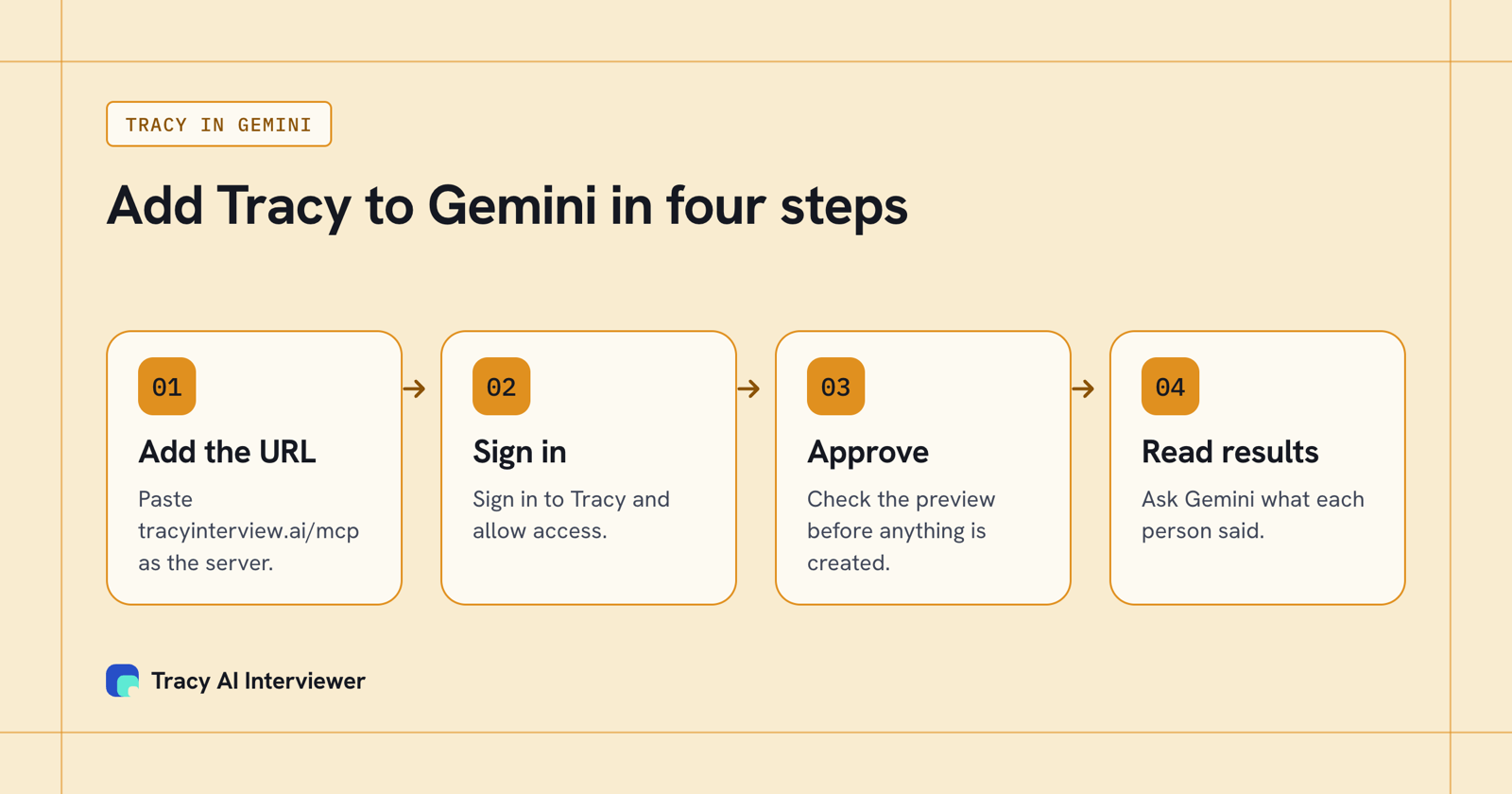
Four steps take Tracy from a server address to a result you can read.
What comes back into the chat
Ask Gemini for results and it returns what each person said to each question, the result fields and a note for your applicant tracking system. By default it gives the latest completed session, and a report appears shortly after a session ends. The recording and a timestamped transcript sit behind each answer. Tracy does not score, rank or reject anyone, so a person reads the evidence and decides. Video interviews can also show integrity signals, such as the person leaving full screen or their face leaving the frame, to the reviewer. These are a prompt to look and never proof, and the candidate is told about the recording on the join screen.
Which path fits you?
- You use Claude: how to add MCP to Claude covers Desktop, web and Code.
- You use ChatGPT: how to add MCP to ChatGPT has the steps.
- You build agents in Copilot Studio: Copilot Studio MCP setup is the equivalent.
- You want the hiring angle: recruiting MCP connects a hiring stack to an assistant.
Common questions
How do you use MCP with Gemini?
How do you set up MCP in Gemini CLI?
Does Gemini support SSE MCP servers?
Which Gemini MCP servers can start an interview?
Add Tracy to Gemini and start one interview
Paste Tracy's server address into Gemini, approve the preview and send one interview link. First 3 results free.
Try it free (opens in a new tab) Book a demo (opens in a new tab)
Your first 3 results are free. No card needed.
Sources
- Gemini API docs: function calling, Remote MCP, retrieved 23 Nov 2026.
- Gemini CLI docs: MCP servers (last updated 6 Oct 2026), retrieved 23 Nov 2026.
- Antigravity docs: Model Context Protocol, retrieved 23 Nov 2026.
- Model Context Protocol: introduction, retrieved 23 Nov 2026.
- Add Tracy AI Interviewer to Gemini (public guide), retrieved 22 Nov 2026.