In short
ChatGPT agent mode is retired: OpenAI's help page says it is no longer available and sends longer tasks to ChatGPT Work. The live comparison is Claude Cowork against ChatGPT Work, and both are multi-step agents that end in files.
Neither interviews applicants. Tracy AI Interviewer runs the interview on video from your agent chat, follows up in the person's field, and starts from the job description you already have.
Let the agent handle the sheets and drafts, and let Tracy do the asking. The first 3 results are free.
Claude Cowork or ChatGPT Work: which is better?
Compare Cowork with ChatGPT Work, not the agent. OpenAI's agent help page now says "ChatGPT agent is no longer available" and points longer, multi-step tasks to Work, which OpenAI announced on 9 July 2026. Between Cowork and Work the closer question is where your team already works: both take a multi-step job, use connected tools and hand back documents, presentations or spreadsheets.
The table sticks to what each vendor says on its own help pages, read on 23 November 2026. It does not score them, because a fair test needs your files and your tools.
What OpenAI's and Anthropic's own pages state, read on 23 November 2026.
| Question | ChatGPT Work | Claude Cowork |
|---|---|---|
| Status | Replaces agent mode, launched 9 July 2026 | Beta in Claude Desktop; paid plans |
| What it does | Multi-step work that ends in a finished deliverable | Multi-step tasks that end in files such as sheets and decks |
| Where it runs | Web and mobile; desktop adds local files and a browser | Cloud sessions; local files through the Desktop app |
| Approvals | Connected-app permissions and approvals still apply | Manual, Auto or Skip modes, and a per-tool Always ask |
| On a schedule | Scheduled Tasks: once, repeat, trigger or monitor | Scheduled tasks run in the cloud without your device |
| Plans and usage | Eligible paid plans; long tasks count toward limits | Pro, Max, Ultra, Team, Enterprise; multi-step tasks use more |
What happened to ChatGPT agent?
Agent mode ran multi-step browser and app tasks, on paid plans only, with monthly message limits that OpenAI listed by plan and confirmations for high-impact actions. The help page for it now carries the retirement notice and the pointer to Work. If you searched for "ChatGPT agent mode" and found old guides, treat them as history: the prices, limits and steps in them describe a feature OpenAI says you can no longer use.
Work is described as an agent "for longer, multi-step work and finished deliverables". OpenAI's launch page says it can take action across your apps and files, and that plugins link ChatGPT to tools such as Slack, Microsoft Teams, Google Drive, SharePoint, email, calendars and CRMs. On the desktop app it can also use local files, a built-in browser and Computer Use. Work follows the same usage structure as Codex, so a long task uses more of your limit than a quick question.
How do Cowork and Work handle access and approval?
Both put a person between the agent and anything it changes, in different ways. OpenAI says connected-app permissions, workspace controls and approval requirements continue to apply in Work, and that on web and mobile you approve or decline an action with on-screen controls. In Cowork you choose a permission mode: Manual asks before acting, Auto runs with an automated check, Skip does not pause. A per-tool Always ask setting makes one connector tool, such as a tool that sends email, wait for you. Claude only reads and writes files in folders you have connected, and asks before permanently deleting anything.
Anthropic is plain about the risk: "Cowork has unique risks due to its agentic nature and internet access." Read that line before you point either agent at candidate data. Claude Cowork examples shows the sort of task teams hand it, and Cowork for HR covers people-team use.
Which AI agent fits your workflow?
Choose by the surface your team already works in.
- If your team works in ChatGPT and its plugins and wants scheduled or triggered tasks, pick Work.
- If your team works in Claude, wants a permission mode per task and reads results as files in a connected folder, pick Cowork.
- If the agent will touch applicant data, use the stricter approval setting either vendor offers, and ask your admin which connectors are switched on.
- If applicants need interviewing, neither agent does that. An agent can sort the spreadsheet and draft the summary; the interview needs a tool built for it.
For a wider comparison of the two assistants, see Claude vs ChatGPT for business.
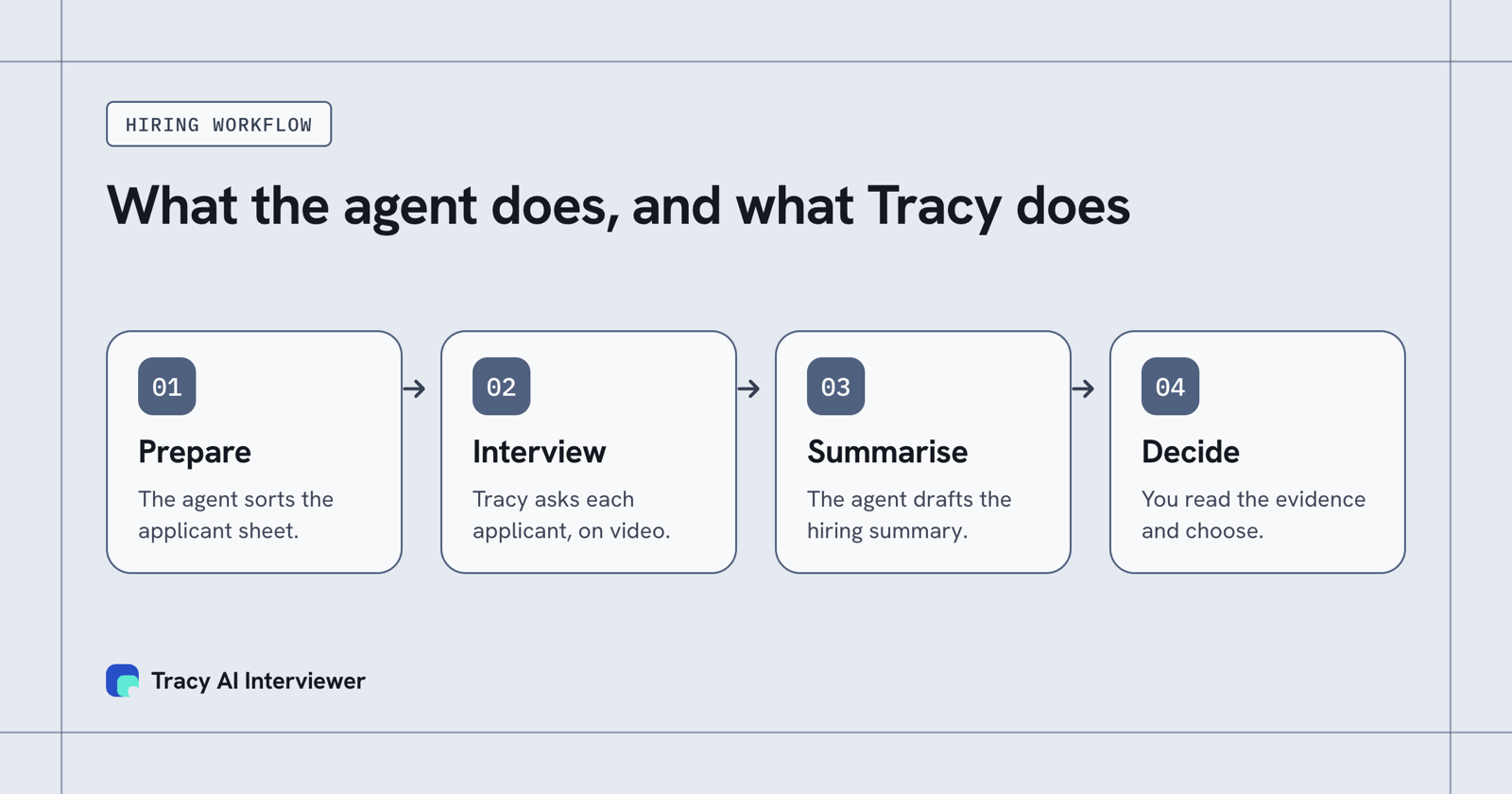
The agent handles the sheet and the summary; Tracy runs the interviews in between.
How does Tracy fit next to either agent?
Tracy AI Interviewer is a remote MCP connector, and it works in Claude Cowork. Anthropic's steps for a custom connector are Customize, Connectors, Add, Add custom connector, then the server address; on Team and Enterprise plans an Owner adds it. Local servers set up in Claude Desktop are a separate mechanism and do not run in cloud Cowork sessions, which is why Tracy's server being remote matters. Tracy's Claude guide has the steps.
In ChatGPT, Tracy installs as a plugin: Plugins, Install plugin, sign in, Allow. Check with your workspace admin that the plugin is available in the place you run Work. The ChatGPT route is documented separately.
From either chat you paste the job description. Tracy drafts the questions, and you edit them or bring your own. Creating the interview and inviting anybody each need your approval of a preview. Applicants then interview from a link, at any hour, in a browser.
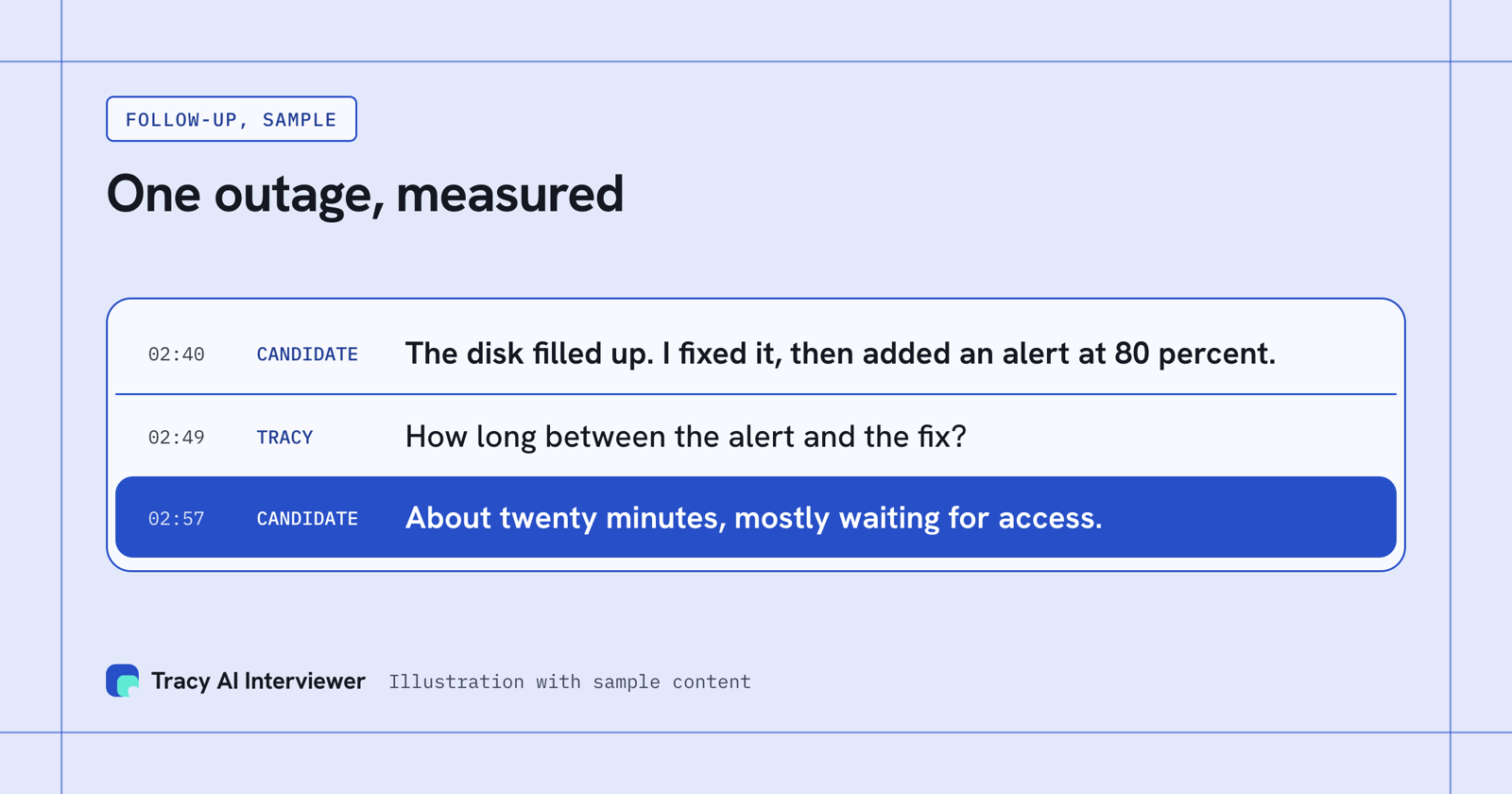
One follow-up question turns a single incident into a specific, checkable answer.
What the interview adds that an agent cannot
An agent works on files and apps you already hold. Tracy creates the material that does not exist yet: what each applicant says when asked, in their own field. In the sample the report records "Has led on-call rotation: yes, for 2 years", with its evidence at question 1, 02:40, and the recording and transcript behind it. Tracy reports what was said and does not score, rank or reject anyone. A hiring manager opens the moment and decides. Results can also be written back to your applicant tracking system.
At volume this holds: Tracy has completed 100K+ interviews, with 99% completion. For engineering roles you can add a coding task inside the interview, followed by questions on approach and trade-offs. A technical interview guide covers what to expect when candidates use assistants themselves.
Which path fits you?
- Starting with Cowork? Read Claude Cowork for recruiters.
- Still choosing an assistant? See Claude vs ChatGPT for recruiting.
- Ready to set up the first interview? Follow the ChatGPT guide or the Claude guide.
- Weighing tools that run the interview? Compare best AI interview agents.
Common questions
Claude Cowork vs ChatGPT Work: which is better?
Which AI agent fits your workflow?
Is ChatGPT agent mode still available?
Does Tracy work in Claude Cowork?
Do the agents score candidates?
Let the agent prepare, Tracy interview
Connect Tracy to Claude or ChatGPT, paste a job description and approve the preview. Applicants interview from a link.
Try it free (opens in a new tab) Book a demo (opens in a new tab)
Your first 3 results are free. No card needed.
Sources
- OpenAI: ChatGPT agent, retrieved 23 Nov 2026.
- OpenAI: ChatGPT Work and Codex, retrieved 23 Nov 2026.
- OpenAI: ChatGPT for your most ambitious work (9 July 2026), retrieved 23 Nov 2026.
- Anthropic: Get started with Claude Cowork, retrieved 23 Nov 2026.
- Anthropic: Custom connectors using remote MCP, retrieved 23 Nov 2026.