In short
Fathom's free plan records and transcribes without a cap, so it has the fewest limits among free AI meeting notes tools. Circleback and Fireflies come next, while Otter, MeetGeek, tl;dv, Tactiq and Read AI cap minutes or meetings.
All of them write up a call a person already sat through. Tracy AI Interviewer holds the first-round call that repeats for every applicant. Each applicant starts on click and Tracy follows up in their own field.
Free plans below were read between 14 and 23 Nov 2026; check a plan page before you rely on a limit.
A free AI meeting notes tool is free up to a cap, and the cap decides which one fits. The nine below are ordered by how much meeting a free plan covers before it stops: no cap on recordings first, then minutes, then a count of meetings or transcripts, and Granola last because its pricing page states no meeting cap. Tracy sits ahead of them for a different job. A recruiter who runs the same twenty-minute screen for every applicant gains more from the call happening without them than from a note of it. For the paid side of this market, see the best AI meeting summary tools.
What are the free plan limits?
Tracy first, then the nine free plans in the order described above. Vendor pricing pages, read 14 to 23 Nov 2026. Check the plan page before you rely on a limit.
| Tool | Free plan covers | The catch |
|---|---|---|
| Tracy | Interviews it runs, 3 results free | Not a meeting notes tool |
| Fathom | Unlimited recordings and transcripts | Some AI features marked limited |
| Circleback | Unlimited meetings, AI notes | 30-day meeting history |
| Fireflies | Unlimited transcription | Limited AI summaries and credits |
| Otter | 300 minutes per user a month | 30 minutes per conversation |
| MeetGeek | 3 hours a month | 3 months of transcript storage |
| tl;dv | Full AI notes for 10 meetings | Then notes cover 10 minutes |
| Tactiq | 10 transcripts a month | 5 AI credits a month |
| Read AI | 5 transcripts and 5 reports a month | Meetings up to 1 hour |
| Granola | Notes without a meeting bot | 30 days of history |
Which free AI meeting notes tool is best?
It depends on the call. Fathom suits people who record many meetings and want no cap, Circleback suits teams that want a bot-free option with API and MCP access, and Otter suits live transcription as long as each conversation stays under 30 minutes. Granola suits in-person and bot-free calls, and its notes are private to you until you share them. These tools write up a conversation a person already had. A hiring team that wants every applicant asked the same questions, with a follow-up when an answer is thin, needs a tool that asks the questions, and Tracy does that.
How many 20-minute screening calls does a free plan cover?
Take a recruiter whose first-round screen runs 20 minutes. Otter's 300 minutes cover 15 of them in a month, MeetGeek's 3 hours cover 9, tl;dv gives full AI notes for the first 10 meetings, Tactiq covers 10 transcripts and Read AI covers 5. Fathom and Circleback state no cap on meetings or recordings. A team screening 100 applicants a week passes every capped plan in the first week or two. Tracy bills per interview instead: 100 interviews of 20 minutes cost $100, because a credit covers each started 20 minutes and a session with no answers is never charged. The sums assume 20-minute calls; change the length and the counts move.
Tracy AI Interviewer, for calls you repeat
- Verdict: Holds the first-round call itself. The applicant opens a link at any hour, with no calendar and no recruiter on the line, and Tracy asks the next question from the answer just given.
- Best for: Technical and high-volume hiring teams with more applicants than interviewers. See high-volume recruitment for the screening problem.
- Trade-off: Self-serve Tracy writes up the interviews it runs. It is not a tool for the meetings your team holds, and notes on calls your own people run are an Enterprise feature, priced to your volume.
- Price: $1 per credit, with no seats to buy.
One Tracy customer cut its average time to hire from 44 days to 7, and Tracy did the work of 53 full-time recruiters in one month. Here is the kind of short note a reviewer reads after a screen, from an invented sample.
Question: Why this role?
Summary: Wants regular hours near home after a long commute.
Quote, 01:10: "I want regular hours, close to home."
Tracy's follow-up: What hours suit you best?
This is sample data. Hundreds of short interviews end up as notes this size, so a person can read them in a sitting.
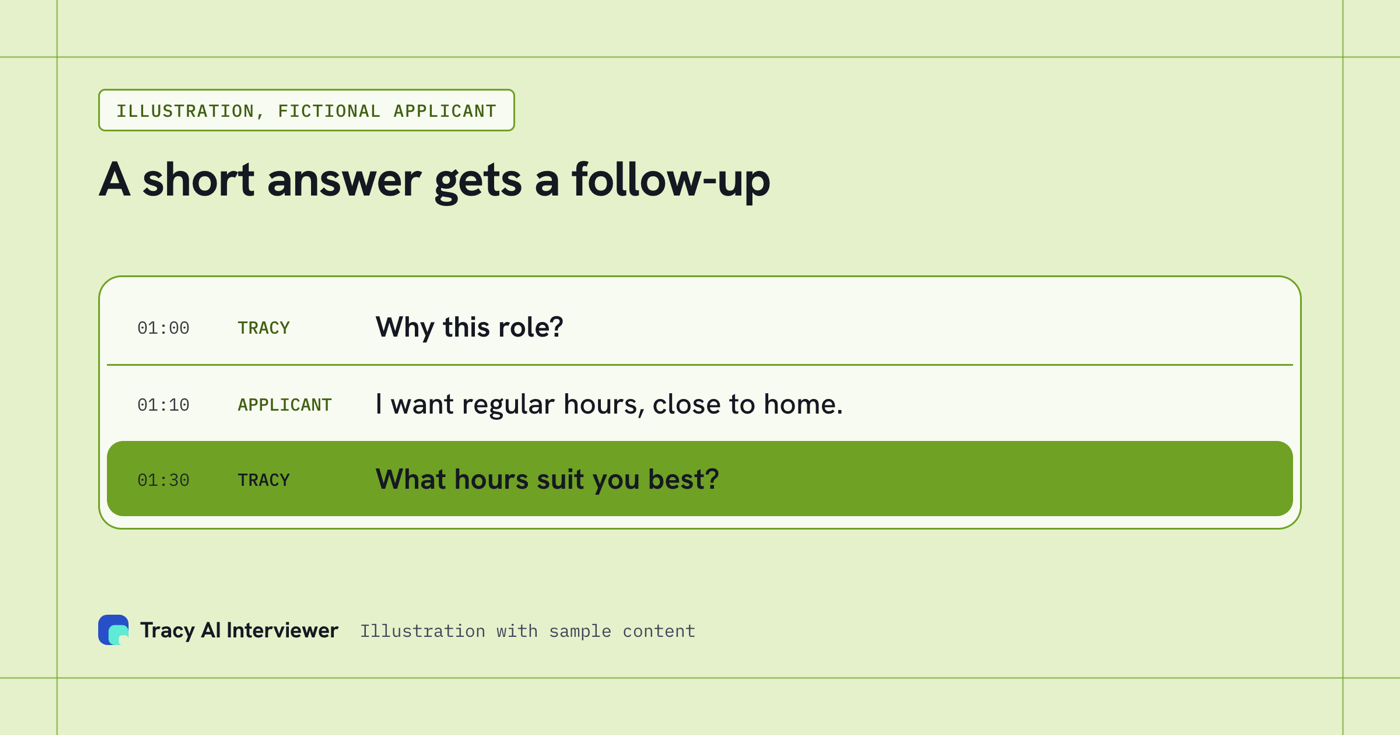
A short answer gets a follow-up, and the reviewer sees the question, the answer and the time.
The nine free plans, in order
1. Fathom
- Verdict: Records and transcribes every meeting on the free plan, with instant AI summaries.
- Best for: People who record a lot and want no cap.
- Trade-off: AI action items, Ask Fathom and automation integrations carry a limited-use label on Free.
- Price: Free; Team $15 per user per month on annual billing.
2. Circleback
- Verdict: AI meeting notes and action items on a free plan with unlimited meetings, a bot or a bot-free desktop app, and API, MCP and CLI access.
- Best for: Teams that want notes without a bot and plan to connect them to other tools.
- Trade-off: Meeting and recording history is 30 days on Free.
- Price: Free; Business $25 per user per month.
3. Fireflies
- Verdict: Unlimited transcription on the free plan, with AI summaries limited.
- Best for: People who mostly need the transcript and can use a few summaries.
- Trade-off: Storage is 400 minutes per team and AI credits are 20.
- Price: Free; paid plans billed per seat.
4. Otter
- Verdict: Live transcription with 300 minutes per user a month on Basic.
- Best for: Short team calls where a live transcript helps.
- Trade-off: Up to 5 members, 30 minutes per conversation, 3 lifetime file imports and the 25 most recent conversations kept.
- Price: Free; Pro $8.33 per user per month on annual billing.
5. MeetGeek
- Verdict: Three free hours a month with recordings up to 2 hours.
- Best for: A person with a few meetings a month.
- Trade-off: Transcripts are kept for 3 months on Basic.
- Price: Free; Pro $9.99 per user per month billed yearly.
6. tl;dv
- Verdict: Joins Zoom, Meet and Teams and gives full AI notes for the first 10 meetings.
- Best for: Teams that want to test the notes before paying.
- Trade-off: After 10 meetings notes cover only the first 10 minutes, and recordings are kept for 3 months.
- Price: Free; Pro EUR 18 per seat per month, annual.
7. Tactiq
- Verdict: Transcribes in the browser; the free plan gives 10 transcripts and 5 AI credits a month.
- Best for: Occasional use on web meetings.
- Trade-off: At the limit Tactiq keeps transcribing and the AI features pause until next month.
- Price: Free; Pro $8 per user per month, annual.
8. Read AI
- Verdict: Meeting reports from an assistant added to the call; Free gives 5 transcripts and 5 reports a month.
- Best for: Light use where a structured report matters more than volume.
- Trade-off: Meetings are capped at 1 hour.
- Price: Free; Pro $15 per user per month, annual.
9. Granola
- Verdict: Notes from your computer's audio, with no bot in the room.
- Best for: In-person meetings and calls where a bot is unwelcome.
- Trade-off: Meeting history is 30 days on Basic, and the free plan leaves out pre-meeting briefs, follow-up emails and API access.
- Price: Free; Business $14 per user per month.
Is Notion AI free?
Not for meeting notes. Notion's pricing page, read on 14 November 2026, lists Free and Plus with only a limited trial of meeting notes, and says you must be on the Business or Enterprise plan to use AI Meeting Notes; Business is listed at $20 per member per month. If your team is already in Notion, how Tracy compares with Notion AI Meeting Notes covers where each fits.
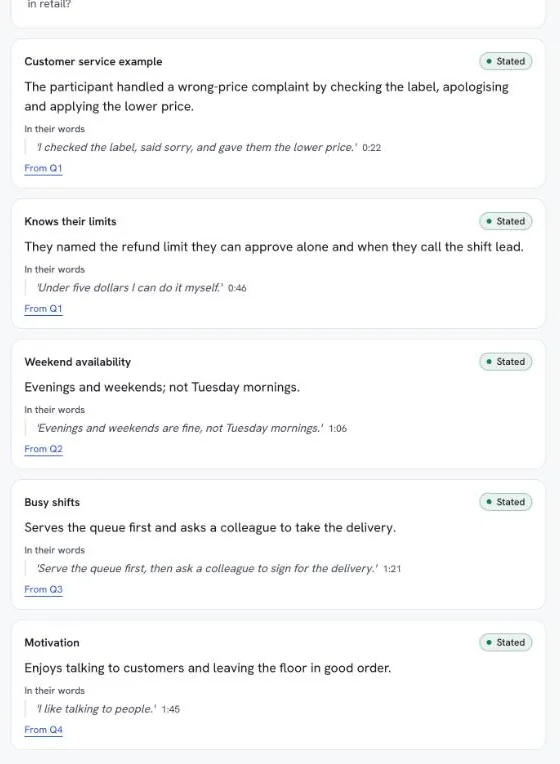
Each answer comes with the person's own words and the time they said them.
Which path fits you?
- Notes on interviews your own team holds: best AI note takers for interviews.
- A transcript or a report: interview transcription software versus interview reports.
- Paid tools across teams: best AI notetakers.
- Minutes or notes: meeting minutes versus meeting notes.
- Screening at volume: Tracy for volume hiring.
Common questions
What are the free plan limits?
Which free tool is best?
Is Notion AI free?
Hand off the calls you keep repeating
Tracy can run the interview itself and return a report with each quote linked to the recording. First 3 results free.
Book a demo (opens in a new tab) Try it free (opens in a new tab)
Your first 3 results are free. No card needed.
Sources
- Fathom, Pricing, retrieved 23 Nov 2026.
- Tracy AI Interviewer, Pricing, retrieved 11 Nov 2026.